
How To
Add a New Employer Note
CCH Personal Tax
To Add a New Disclosure Note
Click on the New icon in the Notes section of the Task Bar.

The New note window is displayed with the name of the employer in the title
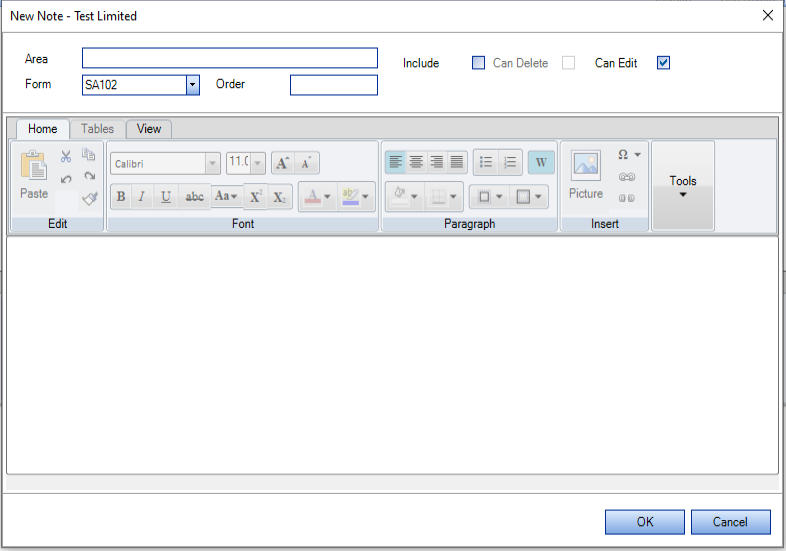
The functionality of the New notes window is as follows:
| Name | Functionality |
| Area | This is a free format area. It is not mandatory. |
| Include | By default this check box is not ticked. Tick to include the Disclosure Note on a Tax Return |
| Can Delete | This check box is only enabled if the Include check box is ticked. By default it is not ticked. Tick if the user is able to delete the note on the Tax Return Disclosure Notes window. |
| Can Edit | By default it is not ticked. Tick if the user is able to edit the note on the Tax Return Disclosure Notes window. |
| Form | This is a drop down box with the different Tax Return pages. It defaults to SA102 and can be changed by the user. |
| Order | This is a numeric field (with format nnn) that together with Order defines the order of the Employer notes on the client Tax Return Disclosure window. |
| Word processing area | This is a free format area. It is mandatory. You can not change the font of the text in this area. |
Populate the fields and enter the text of the disclosure note in the word processing area. Click on the OK button to save the changes. Click on the Cancel button to discard the changes.
Related documents
CCH Personal Tax 2026.2: Release Notes
Release Notes for CCH Personal Tax 2026.2
CCH Personal Tax: End User Data Entry Training (10091177/10091176)
The CCH Personal Tax End User Data Entry Training offers a comprehensive, 3-hour interactive session focused on the creation, filing, and maintenance of SA100 tax returns. Participants will learn data entry processes for various income sources, production of tax computations, and online filing procedures. The course is designed for new users of CCH Personal Tax, provided through a standardized virtual environment via CloudShare, ensuring hands-on interaction. Pre-requisites include knowledge of CCH Central and personal taxation. Additional resources such as eLearning courses, videos, and webinars are available for further learning.
CCH Personal Tax: Partnership Tax and Trust Tax Training (10091200)
CCH Personal Tax: Partnership and Trust Tax Training. This 3-hour session covers data entry, client maintenance, tax return creation, and online filing.
CCH Personal Tax: Partnership Tax Training (10091178)
The document outlines an interactive online training session focused on the tax return data entry process for creating and filing tax returns. Lasting up to 3 hours, it aims to equip participants with knowledge on managing client records, producing tax computations, and ensuring compliance. Key topics include client record creation, data entry for various income sources, and the online filing process. Designed for new users of CCH Partnership Tax, attendees are expected to have a good understanding of CCH Central. Additional resources for further training are also provided.
CCH Personal Tax: Trust Tax Training (10091179)
This document outlines an online training session focused on the data entry process required for tax returns. It includes creating and maintaining client information, producing tax computations, and ensuring accurate tax filing. The session lasts up to 3 hours and aims to equip participants with skills in managing tax return data and client records. Key topics cover the creation of trust client records, data entry for various income types, and the online filing process. It is designed for new CCH Trust Tax users with prior knowledge of CCH Central.