
How To
Copy an Email Template - HTML format
CCH Central
Some practices may already have an existing template which is used to send out emails to contacts. This could be in the form of an html document. The Email Templates window allows you to copy an existing template.
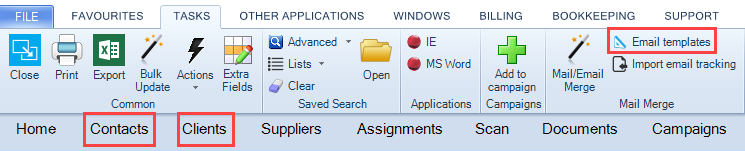
1. From either the Find Contacts or Find Clients search screen, select Email templates from the Task Bar.
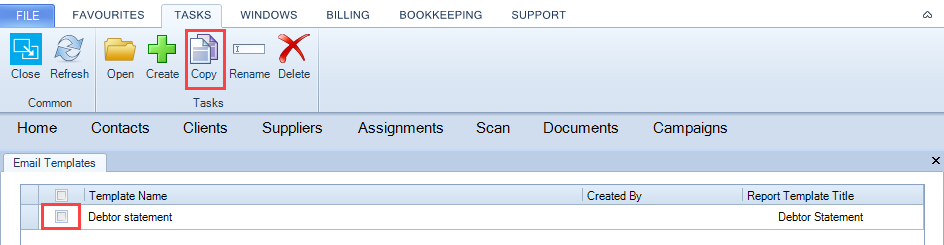
2. The Email Templates tab opens, select the template by ticking on the tick box in the grid and clicking the Copy option from the Task Bar.
3. The following confirmation message is returned.
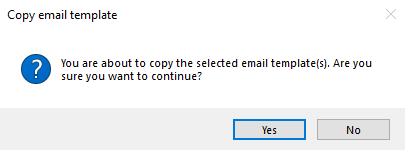
No: cancels the copy option
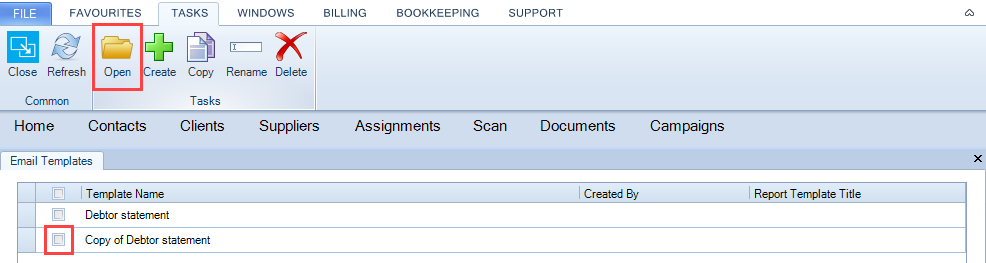
Yes: creates the copy and displays the copy in the email templates list with a prefix of Copy of.
4. Click Open or Double click on the template.
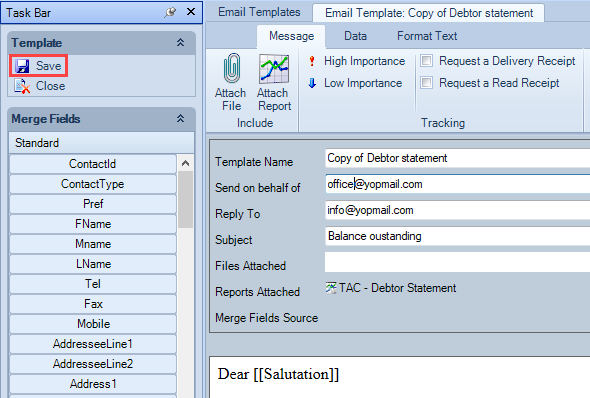
4. The Email Template tab opens, perform any required editing, including amending the name of the template.Once done select Save to apply the changes.
Related documents
CCH Central Suite 2026.3 Update Guide
This guide explains how to update an existing install of the CCH Central Suite to the latest version 2026.3 (including Service Packs and Hotfixes) using the Central Suite Installer (CSI).
Central Suite Installer (CSI) instructions
The document announces the update of the Central Suite Installer (CSI) for the CCH Central Suite, now compatible with the latest releases and service packs and hotfixes of various CCH applications. Key points include prerequisites for installation, compatibility information, and the necessity for proper backup before proceeding with the update. It highlights specific requirements for Microsoft components, and it warns users of CCH Accounts Production regarding regional settings for date format. Support options are mentioned for users seeking assistance during the update process. Release notes are accessible for detailed information on the updates.
Setting up users - CCH Central
This document provides a detailed guide on setting up employees in the CCH Central system to integrate with CCH Trust Accounts. It outlines the necessary steps for creating a new employee, including mandatory fields such as unique identifiers, personal details, and security group assignments. The document emphasizes the importance of specific access rights for CCH Trust Accounts users, particularly for preparing accounts and configuration purposes. Additionally, it includes instructions for adding extra security groups as needed.
CCH Conversions - Data categories and descriptions
This document outlines the key components of standing/static/core data and practice management data necessary for client management in professional services. It details the types of essential client information such as unique client codes, contact details, and employee data. Additionally, it includes information on compliance data related to various tax modules and the ability to import financial records into the system. Document management capabilities for electronic files are also mentioned, along with a reference to a comprehensive guide for preparing and auditing practice data.
Importing Data Services: New Customers
The document outlines data importing services for new customers transitioning to the CCH Central database. It details options for populating client and contact information, including self-service imports and professional services support. Customers can manage data quality through templates for import, thereby maintaining high integrity and facilitating a smooth transition. Additionally, the document discusses converting work in progress (WIP) and debt data, offering options for detailed transaction transfers or top-level balances. It emphasizes a seamless migration experience without system downtime, with support available for various data needs.