
How To
Create New Financial Year
Twinfield
Before you can process and financial transactions into a company, you must define the periods. A company can be setup with a variety of number of periods per year, for example 12 periods or 52 periods. Three additional periods are defined in addition to the standard periods; period 0 for the opening balance, period 55 for the year-end adjustments and period 56 for the closing balance.
Click the settings icon.  Select company settings.  | Followed by the Periods icon.  |
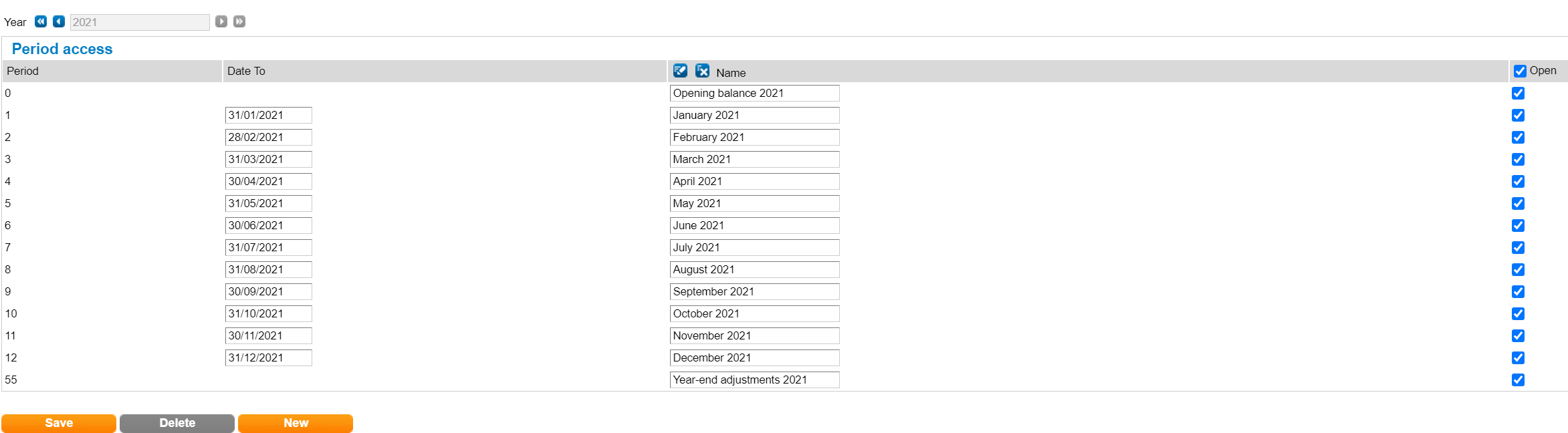
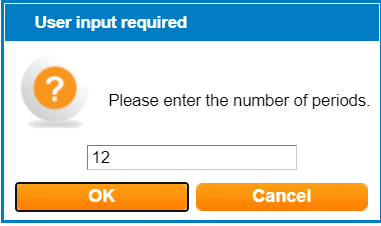
To create a new financial year, click ‘New’. A pop up window will appear where you can confirm the number of periods.
By default the opening period is not available for postings. To allow opening balance entries to be posted into period 0, tick that period.
Related documents
Currency Revaluation Module guide
This document provides a guide on setting up nominal coding for financial reporting, specifically the 'Balance sheet' and 'Profit and Loss' dimensions. It outlines steps for creating general ledger codes, naming accounts, and linking cost centres for further analysis. Additionally, it includes visual aids and a link to a video tutorial for further learning on working with dimensions in financial systems.
Cheques and Paying-in slips
Cheques and Paying-in slips.
Twinfield: Twinfield Analysis Consultancy (10091307)
This document outlines a training course on Twinfield accounting software, designed for Twinfield partners and subscribers. The course, lasting up to 3 hours, focuses on enabling participants to leverage their Excel expertise to manipulate TwinCube data for creating comprehensive financial reports. Key objectives include processing transactions and searching via the reporting module. The session covers various topics such as data cube management, Excel formula building, and conditional formatting. Attendees must have advanced Excel skills and their own devices to join the session, as the course is tailored for Microsoft Windows users.
Twinfield Consultancy (10093303/10080551)
This document outlines a consultancy service for Twinfield users, targeting both partners and subscribers. It emphasizes collaborative sessions aimed at improving operational efficiencies and best practices through tailored advice and process reviews. Conducted online or onsite over two 3-hour sessions, the consultancy covers topics such as reporting, VAT reporting, and reconciliations. Attendees are expected to have a solid grasp of double entry bookkeeping. Additional resources, including eLearning courses, videos, and webinars, are provided for further learning.
Twinfield: Integration Consultancy (10095230/10095228)
This document outlines a consultancy-led course focused on the Twinfield accounting software, designed to assist businesses in managing their financials effectively. The course consists of four interactive sessions—each lasting three hours—covering navigation, invoicing, credit management, transactions, and reporting. Aimed at Twinfield partners and subscribers, participants are expected to have a good understanding of bookkeeping principles. Additional resources such as eLearning courses, videos, and webinars are also provided to enhance learning. The maximum group size is six delegates.