How to create a Share Scheme

Step 1 of 2

A wizard guides you through the share scheme creation process.

  1. Open the Share Schemes section.

  2. Select Click here to create a new share scheme.
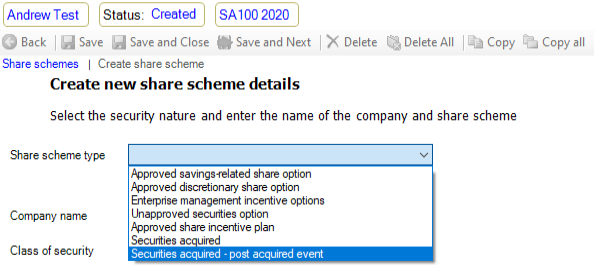
    The create a new share scheme wizard appears.
      Personal_Tax_Tax-Return-Data-Entry_Share-Schemes_Create-a-Share-Scheme_1.png

 3. Complete the following:

  • Share scheme type - Select the type of share issued by the company.
  • Company name - Enter the name of the company issuing the shares.
  • Class of security - Select the share class.

Note: You can add additional classes to the Class of Security pull-down using Common Tax Descriptions.

  1. Click Next. The Select the nature of the event step appears.

  2. From the Share option event type pull-down select one of the following:

  • Exercise options
  • Cancellation or release
  1. Click Next. The Create share scheme summary appears.

  2. Verify that you have entered the correct details and then click Finish.

Step 2 of 2

The information that you enter within the Share Schemes wizard populates some of the fields within Securities options, such as the company name and share class.

To Add Security Options

  1. If the shares are unlisted, then you should select the Is security unlisted check box.

  2. Complete the Exercise Option fields.

  3. Enter any taxable amounts.

  4. Do one of the following:

  • Click Back
  • Click Save and Close.

Related documents

CCH Personal Tax: essentials training online (10133826)
This document outlines a 3-hour interactive training course for CCH Personal Tax users on the process of creating and filing SA100 tax returns. It includes prerequisites, course objectives focusing on data entry and online filing, and a detailed content outline. The training will be conducted through CloudShare, an interactive virtual environment. Additional resources like eLearning courses, instructional videos, webinars, and a customer glossary are also provided to support learners.
CCH Personal Tax: Implementation and set up consultancy (10091206/10091205)
CCH Personal Tax consultancy offers advanced features implementation and process reviews for tax users. The 3-hour sessions, available onsite or online, aim to align specific business needs with the software's functionality while providing hands-on training or full feature implementations. Key objectives include assessing user requirements, optimizing processes, and revising standard firm practices. Participants should have a solid understanding of CCH Central and Personal Tax, as well as personal taxation. A pre-call with consultants will tailor the agenda to meet specific needs.
CCH Personal Tax 2026.3: Release Notes
Release Notes for CCH Personal Tax 2026.3
CCH Personal Tax 2026.3 Service Pack: Release Notes
Release Notes for CCH Personal Tax 2026.3 Service Pack: Release Notes
Enter Agent Credentials
The document outlines the procedures for adding online filing credentials for tax returns, prioritizing employee, departmental, and database credentials. Instructions for adding login details for individual employees involve searching for the employee and entering agent credentials in the Online Filing Details tab. Additionally, there are steps for entering organizational login details via the Tax System Parameters menu, specifying user ID, password, and email, followed by selecting the filing organization type. The document emphasizes related topics for further reference.