This compares the data held in the application with the data shown on the Form CT600 and the Corporation Tax Computations that have been generated but have not yet been submitted to HM Revenue & Customs.

Online Filing Submissions

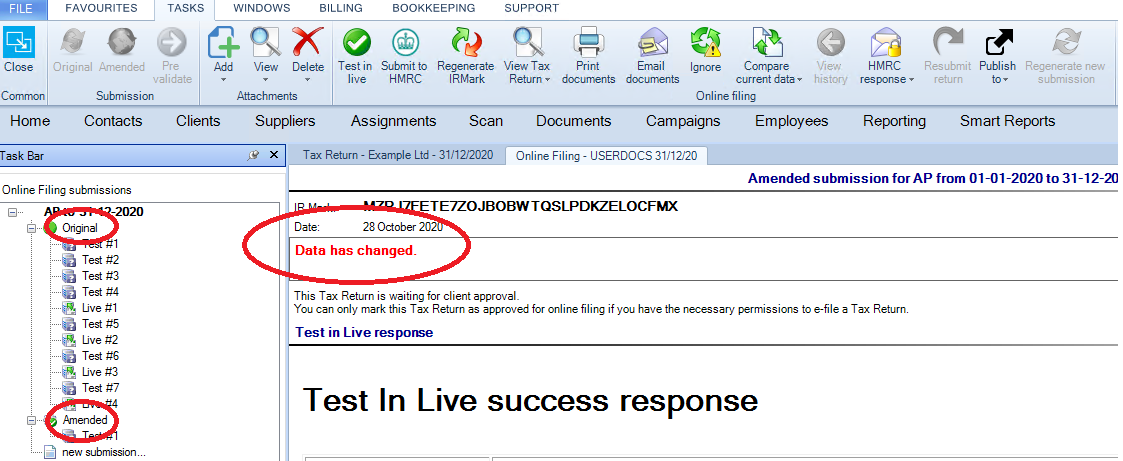
Within Online Filing, select either the Original or Amended in the Task Bar.
clipboard_e1fa3084f7b5bea54916aab5ffa90146f.png

If the data has changed since the IR Mark then a message appears advising the Data has changed.

View Tax Return or Corporation Tax Report Changes

clipboard_e6e6870b5896fa9e200f52bbc35499c0d.png

To view the changes made on either the Corporation Tax Computations or the Form CT600 select Compare current data from the top ribbon and select one of the two options:

  • Tax Return
  • Computations

Tax Return Changes

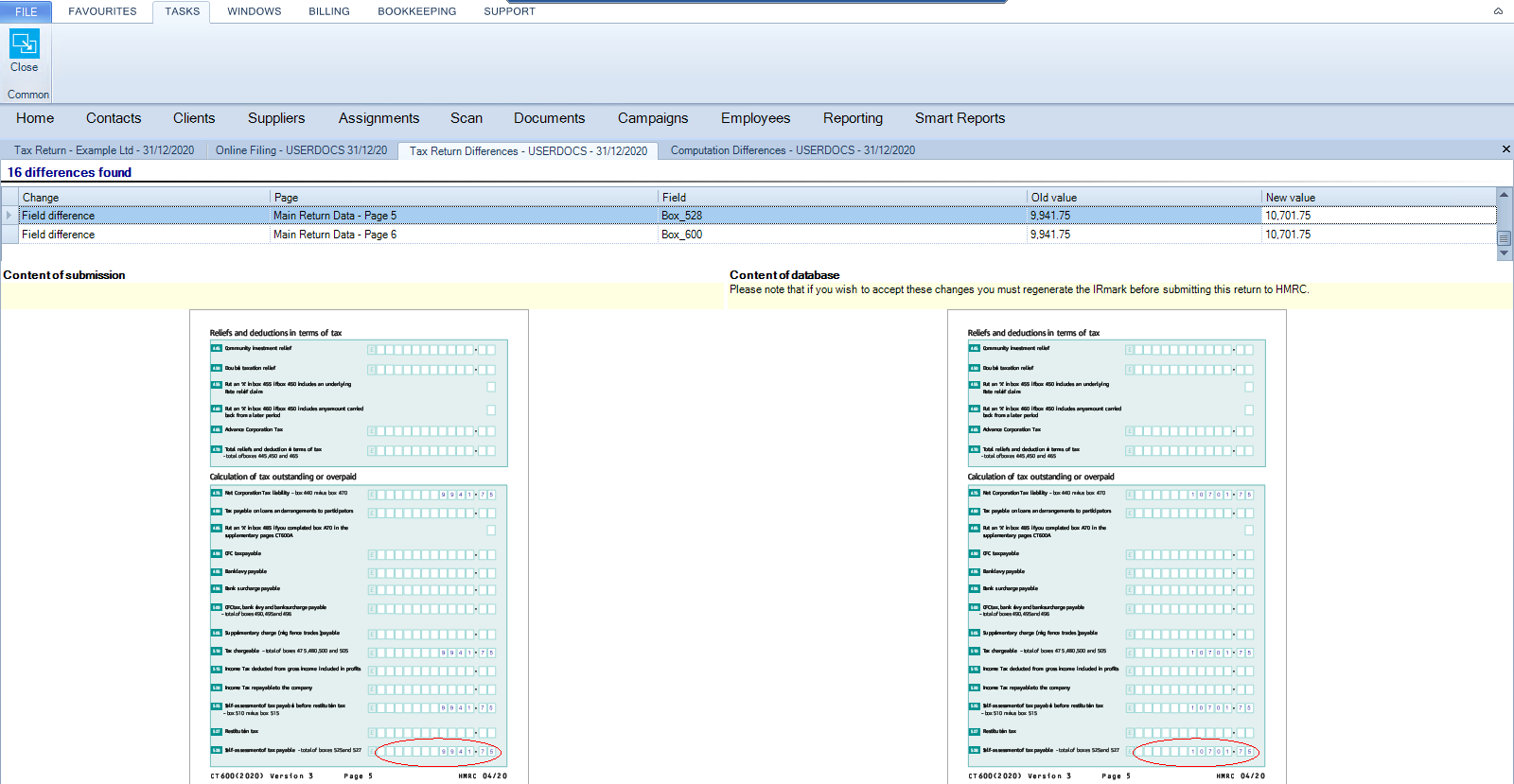
The tax return differences window details the changes at the top of the screen. Use the scroll bar on the right to xscroll down the top menu to view the changes to the boxes on the form CT600.

The Form CT600 where the IR mark has been generated is shown at the left hand side of the screen.  The Form CT600 based on the data held within the application is shown at the right hand side of the screen.  Changes to entries in the boxes on the form CT600 are highlighted in the red circles.
clipboard_e5276fa4ee425e34829a515b423fac5a8.png

Computation Changes

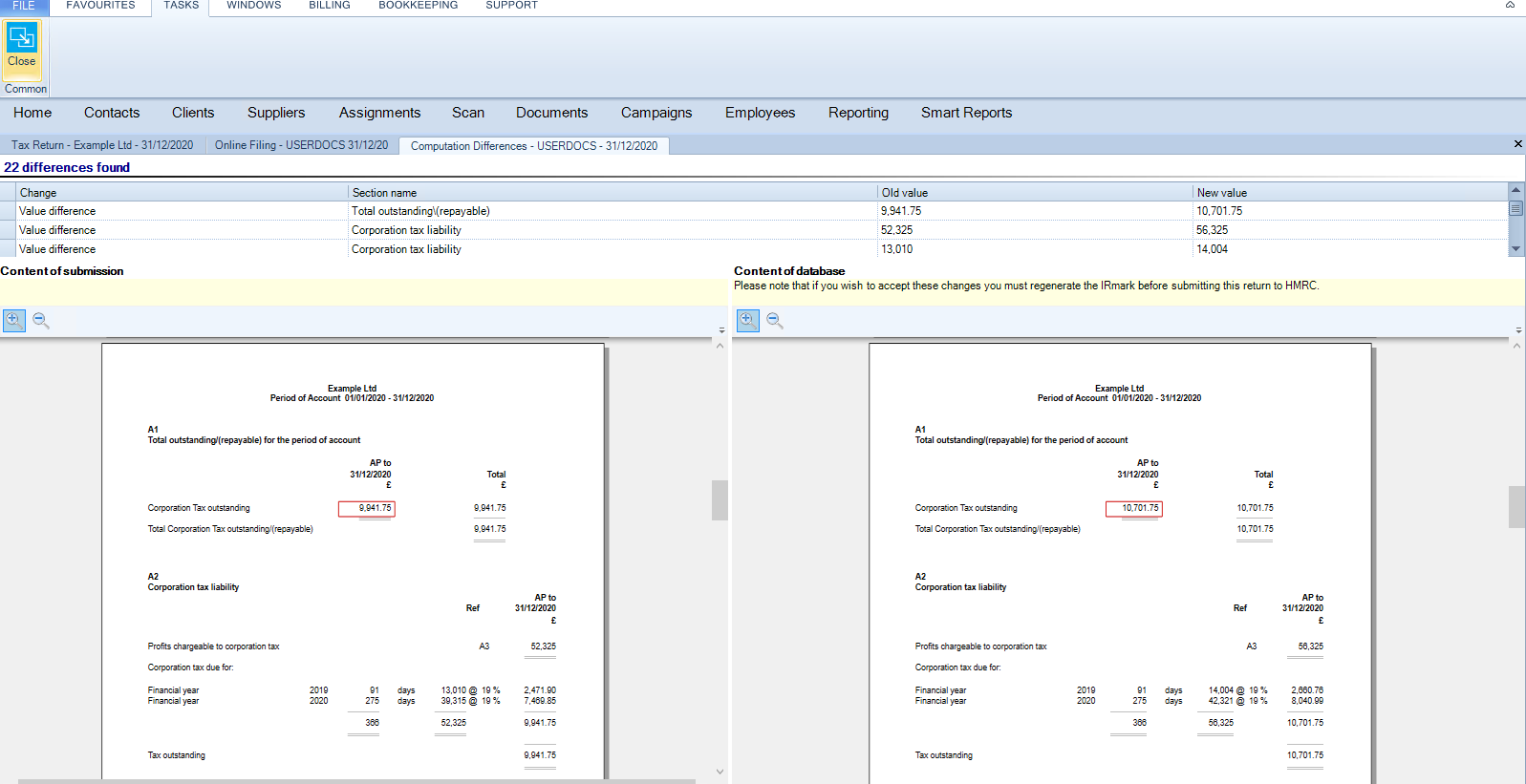
The changes to the corporation tax computations are shown at the top of the screen. Use the Scroll bar on the right to Scroll down to view the changes to the corporation tax computations.

The corporation tax computation where the IR Mark has been generated is shown at the left hand side of the screen. The corporation tax computation based on the data held within the application is shown at the right hand side of the screen. 

Changes to entries in the corporation tax computations are highlighted in Red.

Use the Magnifying glass icons at the top left of the previews to zoom in and out and use the scroll bars to the right and bottom to navigate through the pages of the previews
clipboard_e8a878d545c801b7a126ab18f7dea88f4.png

Related

Related documents

CCH Corporation Tax: Data entry training (10091173/10085296)
This course provides an overview of the data entry process necessary for creating and filing Corporation Tax returns and computations. It includes a 3-hour interactive online session focusing on key objectives such as client information creation, tax return production, and online filing processes. Participants will learn about essential topics like profit adjustments, capital allowances, and using CCH Central software. The course is designed for CCH users familiar with UK Corporation Tax requirements. Pre-requisites include adherence to training guidelines and a solid understanding of relevant software and tax regulations.
CCH Corporation Tax: essentials training online (10133829)
This course offers an introduction to producing and filing CT600 corporation tax returns using data entry processes. Prerequisite knowledge includes completion of CCH Central: essentials. Objectives include learning to prepare computations and complete the online filing. The course lasts 2.5 hours and utilizes the interactive CloudShare training environment. Content covers topics such as creating tax returns, entering trade data, and filing processes. Designed for newcomers to CCH Corporation Tax responsible for tax returns, the course also includes additional resources like eLearning and webinars for further learning.
CCH Corporation Tax 2026.3: Release Notes
Release Notes for CCH Corporation Tax 2026.3
CCH Corporation Tax 2026.2: Release Notes
Release Notes for CCH Corporation Tax 2026.2
Getting Started
This document provides a quick start guide for using CCH Corporation Tax software. It outlines essential features such as the Data Navigator, which assists in completing clients' Returns, and the use of Breadcrumbs for navigation. Additionally, it explains the functions available in the Ribbon panel located at the top of the screen. Overall, the document aims to streamline the user experience by highlighting key tools and navigation methods within the software.