One off Indexing must be selected before any changes are made to the CCH Working Paper Management (WPM) practice pack, or anyone starts to use WPM.

Indexing

Selecting the standard indexing pack to be used throughout the practice

Before any changes are made to the working papers practice pack, or anyone starts to use CCH Working Paper Management, you MUST select or setup the Indexing Pack you wish to use for your practice.

To select / view the default indexing pack used within the practice navigate to File > Maintenance > Working Papers > Indexing Packs

 clipboard_e86a3f9be9033d1b66773b9cedf6e8a21.png

  • If you wish to change the default pack simply tick the required box in the Active column
  • Only one indexing pack can be active
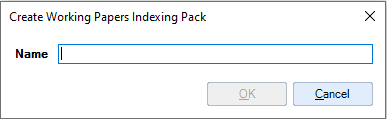
  • If you wish to create a new indexing pack, select the Create button on the ribbon and then enter a name in the Create Working Papers Indexing Pack pop-up and click OK.
    clipboard_efc48b607289cb75b2897cd3462e719c9.png                                         clipboard_e3fbf17d76e286607152630727dac3e94.png

You will now have created an 'empty' indexing pack which can be defined from the Sections screen at the master level.

Sections

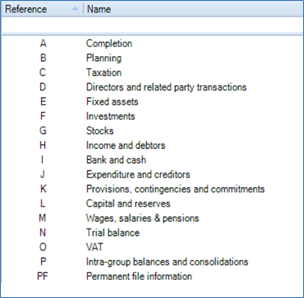
Viewing the predefined sections for the active indexing pack

To view the structure of the indexing pack selected go to File > Maintenance > Working Papers > Sections

Modifying the predefined sections for the active indexing pack

Any amendments to the sections should be made BEFORE you make any changes to the working papers practice pack.

  • The Reference and/or Name can be changed.
  • New sections can be added by clicking in the blank row at the top of the table.
clipboard_e440cbc7495f0085816efd924ccec2587.png

Relationship of Indexing Packs with Master Packs

There is a one-to-one relationship between the indexing pack and the Accounts Production master pack.

Related documents

Document Security (for CCH Document Management Users)
The document provides instructions for setting up rights for working papers. It directs users to navigate to the security settings under "File > Maintenance > Security > Document Security". The default setting grants all users full access to the working papers document type.
Set-up and Master Changes
This document outlines the initial configuration and setup procedures for CCH Working Papers at the master level. Key topics include activating task permissions, selecting indexing packs, managing roles, accessing the working paper management system, creating templates, and employing the Working Papers Designer. It emphasizes the importance of managing sign-off roles for specific papers and master packs, as well as the limitations on modifying master packs provided by CCH. The document serves as a comprehensive guide for efficiently establishing and managing working papers within the system.
Create a Working Papers Practice Pack
The document provides a step-by-step guide on how to create an editable master pack based on the original version shipped by CCH. Users are instructed to navigate to File > Maintenance > Accounts > Master Pack, select the "Create" button, ensure the correct Type and Entity are selected, and then give the new master pack a relevant description before finalizing it. This process allows practitioners to modify the master pack as needed while retaining its original format.
Sticky Notes
The document explains how to use the sticky note feature in lead schedules and MS Excel worksheets. Users can add sticky notes by clicking the Note icon and selecting a figure on the working paper to comment on. Comments can be directed to specific individuals, and notifications will appear in relevant panels. Multiple notes can be added, and their visibility is distinguished by color based on the commenter’s role. This functionality is not available for Microsoft Word, PDFs, or images.
Task Permissions: CCH Working Paper Management
This document outlines how to activate permissions for CCH Working Papers and CCH Document Management. It specifies that task permissions can be found under "File > Maintenance > Security > Task Permissions," where users should select "Working Papers" from the product list and choose the appropriate security group. An accompanying image illustrates this process.