
How To
Lease Premiums
CCH Corporation Tax
This is for lease premiums related to land and property only. Use this window to claim tax relief for lease premiums paid and for tax adjustments for lease premiums received.
The Lease Premiums input screen is located within the trade of the Data Navigator.
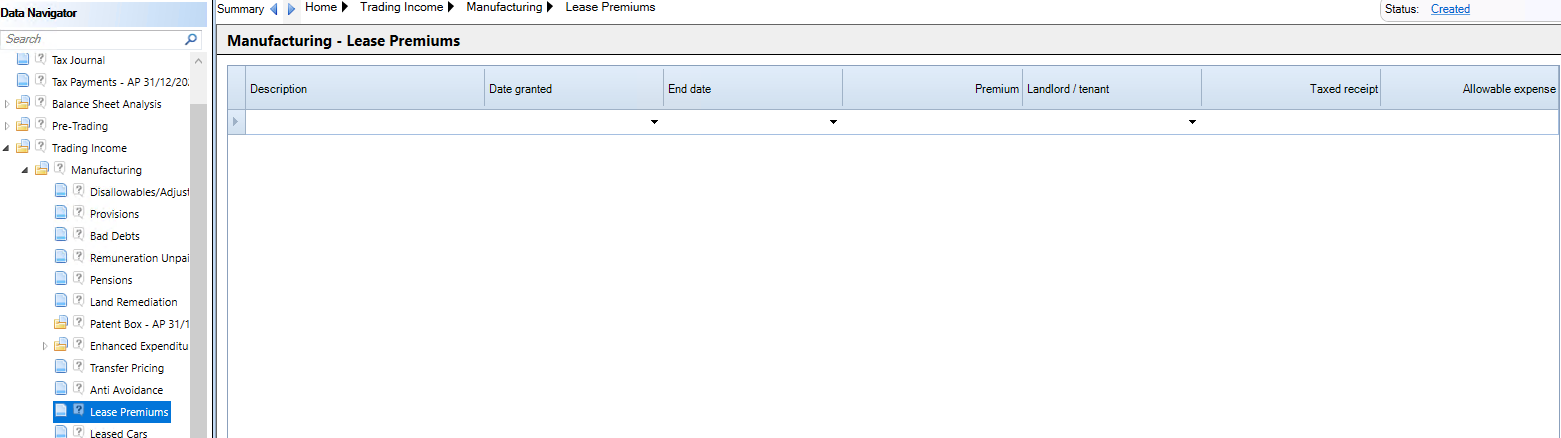
- Enter a Description for each lease
- The Date Granted field refers to the commencement date of the lease and the End date refers to the cessation date of the lease.
- Enter any Premium paid or received on granting of the lease
- Select Landlord/Tenant from the dropdown. The option to choose Landlord is only available when the trade is either a UK Property or Overseas Property Business.
Related documents
CCH Corporation Tax: Data entry training (10091173/10085296)
This course provides an overview of the data entry process necessary for creating and filing Corporation Tax returns and computations. It includes a 3-hour interactive online session focusing on key objectives such as client information creation, tax return production, and online filing processes. Participants will learn about essential topics like profit adjustments, capital allowances, and using CCH Central software. The course is designed for CCH users familiar with UK Corporation Tax requirements. Pre-requisites include adherence to training guidelines and a solid understanding of relevant software and tax regulations.
CCH Corporation Tax: essentials training online (10133829)
This course offers an introduction to producing and filing CT600 corporation tax returns using data entry processes. Prerequisite knowledge includes completion of CCH Central: essentials. Objectives include learning to prepare computations and complete the online filing. The course lasts 2.5 hours and utilizes the interactive CloudShare training environment. Content covers topics such as creating tax returns, entering trade data, and filing processes. Designed for newcomers to CCH Corporation Tax responsible for tax returns, the course also includes additional resources like eLearning and webinars for further learning.
CCH Corporation Tax 2026.3: Release Notes
Release Notes for CCH Corporation Tax 2026.3
CCH Corporation Tax 2026.2: Release Notes
Release Notes for CCH Corporation Tax 2026.2
Getting Started
This document provides a quick start guide for using CCH Corporation Tax software. It outlines essential features such as the Data Navigator, which assists in completing clients' Returns, and the use of Breadcrumbs for navigation. Additionally, it explains the functions available in the Ribbon panel located at the top of the screen. Overall, the document aims to streamline the user experience by highlighting key tools and navigation methods within the software.