Where there are companies in a group for which you do not complete Tax Returns, create a contact record instead of a client record. When added to the group, these show as non clients and include details in the Non clients only column.

Add profit / loss for a non client

To correctly represent the entire group profit and loss position, add details of the profits and losses for any companies which are created as contact records.

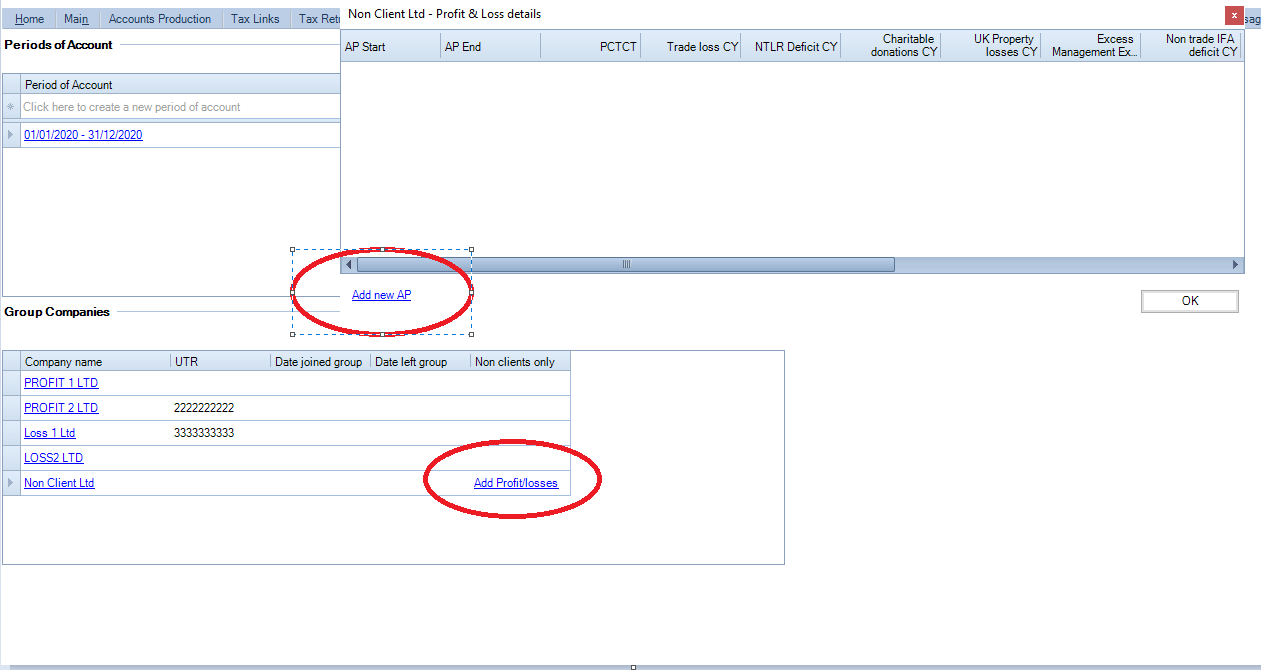
The information can be added using the Add Profit/losses hyperlink from either the Tax Group tab or from the Companies in group data node within a group period of account.
clipboard_eb3431099ece9c31c962cd5f1874e8514.png

Click on the Add Profit/losses hyperlink.

A new window Profit & Loss details for the contact company opens.

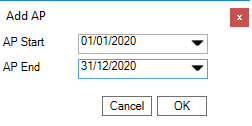
Click Add new AP.
clipboard_ee19bec515fbbc34dc6c21e8b3c46d274.png

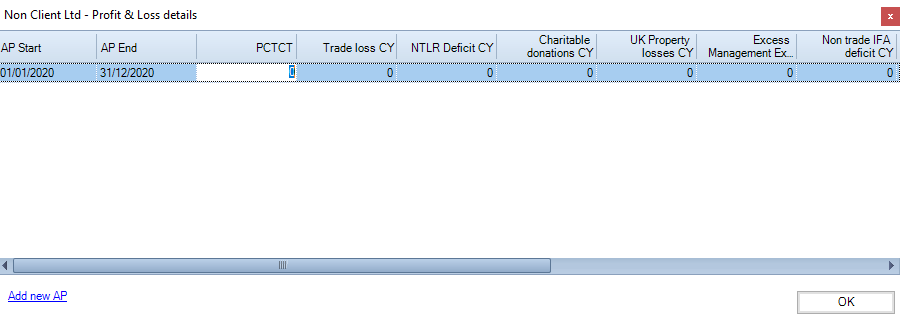
Add the accounting period start and end dates for the company and select OK.
clipboard_eb36a4add2568c8f60c7158d7c70f571b.png

Enter details of the profit or loss for each category.

The information for multiple accounting periods for the company can be added by clicking Add new AP and repeating the steps above each time.

Select OK once details are complete.

You can amend the profit and loss figures by clicking on Add Profit/losses and editing the information in the Profit & Loss details window.

Related documents

CCH Corporation Tax: essentials training online (10133829)
This course offers an introduction to producing and filing CT600 corporation tax returns using data entry processes. Prerequisite knowledge includes completion of CCH Central: essentials. Objectives include learning to prepare computations and complete the online filing. The course lasts 2.5 hours and utilizes the interactive CloudShare training environment. Content covers topics such as creating tax returns, entering trade data, and filing processes. Designed for newcomers to CCH Corporation Tax responsible for tax returns, the course also includes additional resources like eLearning and webinars for further learning.
CCH Corporation Tax 2026.3: Release Notes
Release Notes for CCH Corporation Tax 2026.3
CCH Corporation Tax 2026.2: Release Notes
Release Notes for CCH Corporation Tax 2026.2
Getting Started
This document provides a quick start guide for using CCH Corporation Tax software. It outlines essential features such as the Data Navigator, which assists in completing clients' Returns, and the use of Breadcrumbs for navigation. Additionally, it explains the functions available in the Ribbon panel located at the top of the screen. Overall, the document aims to streamline the user experience by highlighting key tools and navigation methods within the software.
Non Trade Loan Relationships
This document outlines topics related to Non Trade Loan Relationships in corporate tax computations. It includes links to sections on Non Trade Loan Relationship Summary, Credits, and Debits, detailing how to input and summarize these tax-related items in the Data Navigator. Each section describes the process for entering data and how totals are summarized for reporting purposes. Additionally, it links to related topics like Foreign Income and Miscellaneous Income.