
How To
Non Trade Loan Relationship Debits
CCH Corporation Tax
This is where Non Trade Loan Relationship Debits are entered. Any data is carried across to the Non Trade Loan Relationship Summary window.
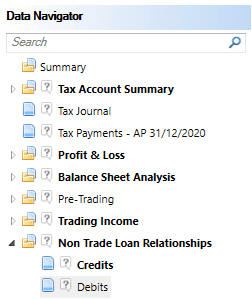
The Non Trade Loan RelationshipDebitsinput screen is located under Non Trade Loan Relationshipsin theData Navigator.
The statement can be input directly or linked from theProfit & Lossif inserted.

In the first period created on CCH Corporation Tax, any not trade loan relationship debits accrual from the previous Period of Accounts should be entered in B/Fwd and this value will be rolled forward from the current period’s C/fwd in the next period.
The Per Accounts figure can be entered or linked from theProfit & Loss.
Enter anyamountAllowablein the Accounting Period. More than oneAllowablecolumn will appear if the Period of Account straddles more than one Accounting Period.
Enterany NTLR credit that is not taxable in theNon Taxablecolumn.
Entries in theAdjustment to cfwd column will furthermore adjust theCfwd.
Related
Related documents
CCH Corporation Tax: essentials training online (10133829)
This course offers an introduction to producing and filing CT600 corporation tax returns using data entry processes. Prerequisite knowledge includes completion of CCH Central: essentials. Objectives include learning to prepare computations and complete the online filing. The course lasts 2.5 hours and utilizes the interactive CloudShare training environment. Content covers topics such as creating tax returns, entering trade data, and filing processes. Designed for newcomers to CCH Corporation Tax responsible for tax returns, the course also includes additional resources like eLearning and webinars for further learning.
CCH Corporation Tax 2026.3: Release Notes
Release Notes for CCH Corporation Tax 2026.3
CCH Corporation Tax 2026.2: Release Notes
Release Notes for CCH Corporation Tax 2026.2
Getting Started
This document provides a quick start guide for using CCH Corporation Tax software. It outlines essential features such as the Data Navigator, which assists in completing clients' Returns, and the use of Breadcrumbs for navigation. Additionally, it explains the functions available in the Ribbon panel located at the top of the screen. Overall, the document aims to streamline the user experience by highlighting key tools and navigation methods within the software.
Non Trade Loan Relationships
This document outlines topics related to Non Trade Loan Relationships in corporate tax computations. It includes links to sections on Non Trade Loan Relationship Summary, Credits, and Debits, detailing how to input and summarize these tax-related items in the Data Navigator. Each section describes the process for entering data and how totals are summarized for reporting purposes. Additionally, it links to related topics like Foreign Income and Miscellaneous Income.