
How To
Associations for Accounts Production
CCH Accounts Production
An Association is the mechanism by which contacts are associated with clients. Any number of association types can be set up to describe any relationship. Once the association is made in CCH Central its details become visible in any accounting period to which it is relevant.
Adding an association
The associations (relationships) of the Officers of an entity work in conjunction with the Officers screen, the details of which appear in the Associations tab and the Officers screen. Other associations are linked through the Associations tab within the client screen.
To manage Associations from the client screen:
- Choose the Associated tab from within the client screen.
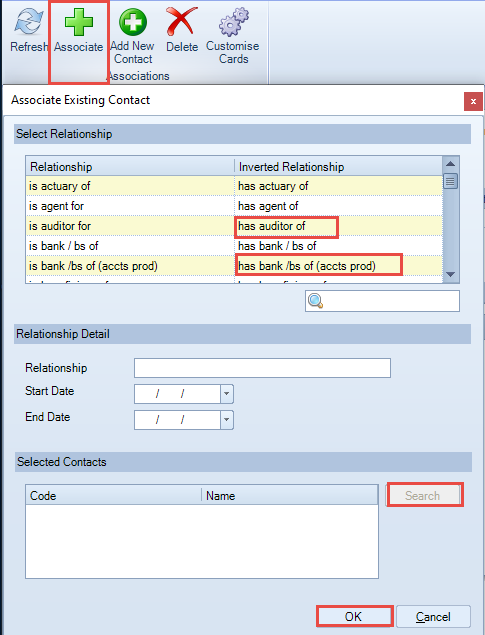
- Click Associate on the Ribbon.
- Choose the Inverted relationship from the dialogue box, e.g. “has auditor of” to add the accountant or auditor.
Note: do not use "has accountant of" as the statutory database determines the wording 'Accountant' or 'Auditor' within the accounts. Similarly, if adding a bank use the inverted relationship "has bank/bs of (accts prod)". - This relationship will be shown in the Relationship field, if incorrect just click on the correct inverted relationship and it will change.
- The start and/or end dates may be left blank when first associating. The end date will be entered when an association ends, and is entered on the Associated tab or Officers screen.
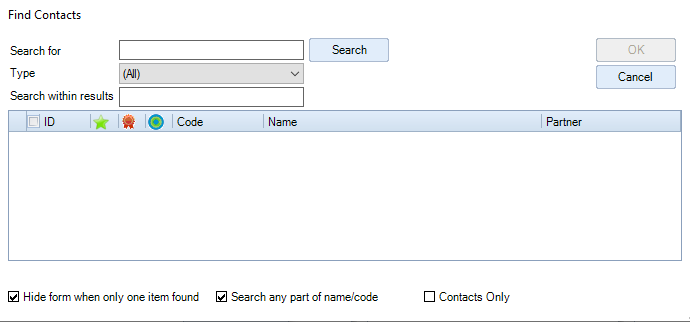
- Click Search to open the Find Contacts box to be able to search for the contact, select the contact, click OK to close the search box.
- Click OK to accept and close the Associate box.
This association has now been made between the client and the contact.
Unlinking an association made in error
The Delete option on the ribbon unlinks the association, it does not delete it from Central so it will be available for others to use.
Related documents
CCH Accounts Production/iXBRL essentials training online (10133804)/(10133819)
This document outlines a course on using CCH Accounts Production software, aimed at helping new users efficiently produce statutory accounts. The course includes 1 x 2 hour session and 1 x 3 hour session focusing on practical skills such as setting up accounting periods, importing trial balances, and navigating the software. It is designed for all employees involved in preparing statutory accounts. Training is conducted in an interactive environment called CloudShare, with additional resources available online for further learning and support.
CCH Accounts Production: essentials training online (10133819)
This document outlines a course on using CCH Accounts Production software, aimed at helping new users efficiently produce statutory accounts. The course includes two 2-hour sessions focusing on practical skills such as setting up accounting periods, importing trial balances, and navigating the software. It is designed for all employees involved in preparing statutory accounts. Training is conducted in an interactive environment called CloudShare, with additional resources available online for further learning and support.
CCH Accounts Production 2026.3 Hotfix: Release Notes
Release Notes for CCH Accounts Production 2026.3 Hotfix
CCH Accounts Production 2026.3: Release Notes
Release Notes for CCH Accounts Production 2026.3
CCH Accounts Production 2026.2: Release Notes
Release Notes for CCH Accounts Production 2026.2