The Search panel sits to the right of the document centre window. It is advised to keepit pinned in view using the pin button

DM Search Push PIn.png

Keyword in Filename \ Document Content - Document Search 

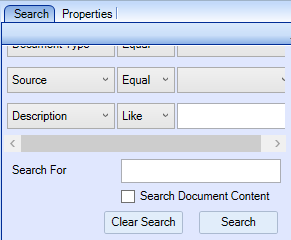
 When you perform a search, in the Search For field CCH Document searches the document File Name.

You can select the Search Document Content tick box to search for words within a document, all matching documents will display.
clipboard_ea887edfea865ce0c4b87a240c100642d.png

  • If one or more words are entered in the Search For field then the search will return any documents that contain ALL of the words in any order or position.
  • If one or more words are entered within double quotes then the search will return any documents that contain that phrase.

You can combine the above two options to find any documents that contain a specific phrase AND certain words, e.g. "Statement of Account" 2014 will find any documents that contain the phrase Statement of Account AND the year 2014 anywhere within them.

In addition the basic search allows you to search for a specific document Id.  Enter the text IDfollowed by the number, e.g. ID123, then click on Search.

Desecription - Document Search 

To search the contents of the Description field of documents , enter the prefix D% followed by the search text e.g. D%project then click on Search.

DocID - Document Search 

To search for a specific document Id.  Enter the text IDfollowed by the number, e.g. ID123, then click on Search

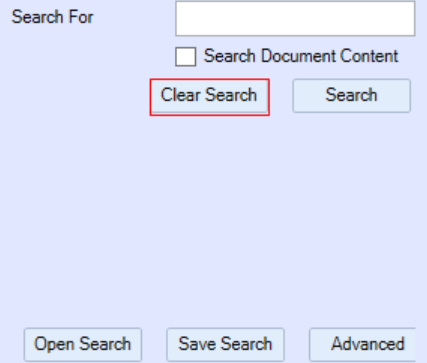
Note: Before or after performing a search, click Clear Search to remove search filters
clipboard_e44a0de1b3e41b9972da235ea10f23f65.png

Excluded Words

SQL Server does not index certain words that are seen as not adding any value to a full-text index. As well as being excluded from the index they are disregarded when used in search criteria.

The default list of words is as follows. (In addition the $ symbol, all single letters and single digits are excluded.)

about being from into never should they were
after between get is no since this what
all both got it now so those when
also but had its of some through where
an by has just on still to which
and came have like only such too while
another can he make or take under who
any come her many other than up will
are could here me our that use with
as did him might out the very would
at do himself more over their want you
be does his most re them was your
because each how much said then way
been else if must same there we
before for in my see these well

Related documents

CCH Document Management 2025.1: Release Notes
The CCH Document Management 2025.1 Release Notes detail the installation process using the Central Suite Installer and highlight new software enhancements, particularly for integrating with CCH iFirm's AML, Personal Tax, and Accounts Production products. Key features include enabling document saving, managing document types, setting default assignments, and adjusting monitoring configurations for filing documents. Additionally, troubleshooting tips are provided for issues related to document visibility within a client's Document Centre. The document emphasizes the importance of user permissions and system settings to ensure proper functionality.
CCH Document Management 2026.3: Release Notes
Release Notes for the CCH Document Management 2026.3
CCH Document Management: enhanced training online (10133824)
This document outlines an enhanced training course on CCH Document Management, focused on customization, delegation, and preferences for document handling. Prerequisite completion of the essentials course is required. The course, lasting 3 hours and delivered via the CloudShare platform, aims to deepen participants' understanding of advanced features in document management. It is designed for document-focused roles, covering topics such as document structure, client document centers, and email filing. Resources for further learning are also provided.
CCH Document Management: essentials training online (10133823)
The document outlines a training course for CCH Document Management, a comprehensive system for managing client documentation within CCH Central. Participants will learn to navigate, store, and retrieve documents using a Microsoft plug-in in a GDPR compliant environment. The course is designed for all employees who handle documents, lasts 3 hours, and employs the CloudShare interactive training platform. It includes various topics related to document management structures and offers additional resources for further learning. Completion of CCH Central essentials is a prerequisite for attendees.
CCH Packs: Document Management Implementation Consultancy
This document outlines the structure and objectives of an online consultancy session for implementing a document management system, specifically CCH Document Management. The session, lasting up to 3 hours, aims to refine document management processes, set up security measures, and create a standardized letter template. Participation is encouraged from business decision-makers and administrative staff to facilitate smooth implementation. Attendees should be familiar with existing systems and come prepared with relevant materials. The agenda includes reviewing current systems, understanding CCH functionalities, and discussing document management policies. Resources for additional learning are also provided.