
How To
Check In Documents
CCH Document Management
After you have finished working on a document you must check it in so that others can work on the document. If you want to know how to add a document, which automatically checks it in at the same time see: Add Document for Client or Contact.
Check In Documents
When a document is checked out, this symbol will appear in the Checked out column in the main screen

- Either in a Client or Contact record or in the Global Document area, locate the document that you want to check in.
- Do one of the following to check in the document:
- Right-click the document and select Check In.
- Click Check In under Version Control on the Task Bar.
- Click on the red cross in the top right corner of the document.
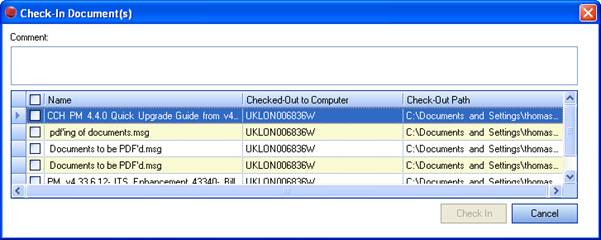
- In Comment box you can add details relating to the changes made to the document.
- To check in one or more documents, click the check box next to the document name and then click Check In.
A new version of the document is created.
Note: You can also check in documents from within MS Word and MS Excel.

Related documents
CCH Document Management 2025.1: Release Notes
The CCH Document Management 2025.1 Release Notes detail the installation process using the Central Suite Installer and highlight new software enhancements, particularly for integrating with CCH iFirm's AML, Personal Tax, and Accounts Production products. Key features include enabling document saving, managing document types, setting default assignments, and adjusting monitoring configurations for filing documents. Additionally, troubleshooting tips are provided for issues related to document visibility within a client's Document Centre. The document emphasizes the importance of user permissions and system settings to ensure proper functionality.
CCH Document Management 2026.3: Release Notes
Release Notes for the CCH Document Management 2026.3
CCH Document Management: enhanced training online (10133824)
This document outlines an enhanced training course on CCH Document Management, focused on customization, delegation, and preferences for document handling. Prerequisite completion of the essentials course is required. The course, lasting 3 hours and delivered via the CloudShare platform, aims to deepen participants' understanding of advanced features in document management. It is designed for document-focused roles, covering topics such as document structure, client document centers, and email filing. Resources for further learning are also provided.
CCH Document Management: essentials training online (10133823)
The document outlines a training course for CCH Document Management, a comprehensive system for managing client documentation within CCH Central. Participants will learn to navigate, store, and retrieve documents using a Microsoft plug-in in a GDPR compliant environment. The course is designed for all employees who handle documents, lasts 3 hours, and employs the CloudShare interactive training platform. It includes various topics related to document management structures and offers additional resources for further learning. Completion of CCH Central essentials is a prerequisite for attendees.
CCH Packs: Document Management Implementation Consultancy
This document outlines the structure and objectives of an online consultancy session for implementing a document management system, specifically CCH Document Management. The session, lasting up to 3 hours, aims to refine document management processes, set up security measures, and create a standardized letter template. Participation is encouraged from business decision-makers and administrative staff to facilitate smooth implementation. Attendees should be familiar with existing systems and come prepared with relevant materials. The agenda includes reviewing current systems, understanding CCH functionalities, and discussing document management policies. Resources for additional learning are also provided.