Creating a VAT return

To submit a VAT return to HMRC via MTD you must create the VAT return.  Provisional and final posted transactions will appear on the VAT return.  Once a provisional transaction is included on a VAT return it becomes locked and you are unable to delete or edit values or tax codes on the transaction.  To ensure all relevant transactions which fall due are included, review the ‘Provisional transactions’ area before running the VAT return.

 Click on the VAT icon

clipboard_e95413cfb5e800ba34980d7d576b32481.png

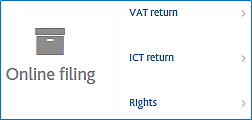
Select ‘Online filing’

clipboard_e9b9aad2992cb9e0c710baf066dc462db.png

Selecting the correct period to calculate

VAT returns are calculated based on the calendar year rather than the financial year, ensure that the year selected in the table of available periods is for the starting month for the period being calculated.

clipboard_e5800c999e57bb7bf34b6b2d2a00a7f3c.png

To calculate the VAT return by clicking the orange star to the right of the list clipboard_e99b1f64b2d7aa8e590ec021cda6003e8.png

Action Buttons

clipboard_e51a4e3591979a74c6525abd7ae44b2ee.png - Delete the draft VAT return to recalculate

clipboard_e669b6531b1a56cd59f3d5a00f8758704.png - Create a new VAT return

clipboard_e7d115e462a2cc9dcb6a903c8c91998ba.png - View the declaration form and VAT analsysis reports

clipboard_e9ccb5dcce9a9b65f1182e72a4aac7b89.png - Approve VAT return for submission

 clipboard_e5050deafbcae09828996692bd0ea03ef.png - Submit VAT return via HMRC MTD Gateway

clipboard_e5e17ff0ae9e80b8ab82ab4abef0e2f7b.png - Reject VAT return - Not used with MTD submissions

clipboard_ee1abb316dec7848b5bf339f36b7e398b.png - Finalise VAT return - Not used with MTD submissions

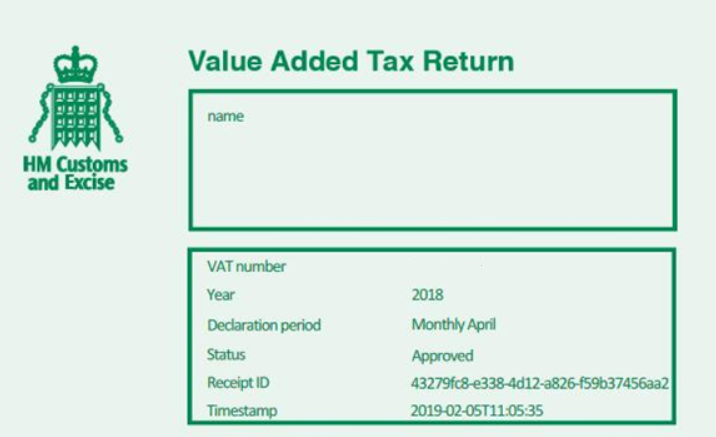
Once the VAT return has been submitted click on the VAT declaration icon clipboard_e7d115e462a2cc9dcb6a903c8c91998ba.png to view the receipt ID and timestamp, this should be checked as part of the submission process to confirm that a receipt ID and timestamp has been received from HMRC.

clipboard_e9354865bc3edafa9b6d818f57da1667c.png

Related documents

Cheques and Paying-in slips
Cheques and Paying-in slips.
Twinfield: Twinfield Analysis Consultancy (10091307)
This document outlines a training course on Twinfield accounting software, designed for Twinfield partners and subscribers. The course, lasting up to 3 hours, focuses on enabling participants to leverage their Excel expertise to manipulate TwinCube data for creating comprehensive financial reports. Key objectives include processing transactions and searching via the reporting module. The session covers various topics such as data cube management, Excel formula building, and conditional formatting. Attendees must have advanced Excel skills and their own devices to join the session, as the course is tailored for Microsoft Windows users.
Twinfield Consultancy (10093303/10080551)
This document outlines a consultancy service for Twinfield users, targeting both partners and subscribers. It emphasizes collaborative sessions aimed at improving operational efficiencies and best practices through tailored advice and process reviews. Conducted online or onsite over two 3-hour sessions, the consultancy covers topics such as reporting, VAT reporting, and reconciliations. Attendees are expected to have a solid grasp of double entry bookkeeping. Additional resources, including eLearning courses, videos, and webinars, are provided for further learning.
Twinfield: Integration Consultancy (10095230/10095228)
This document outlines a consultancy-led course focused on the Twinfield accounting software, designed to assist businesses in managing their financials effectively. The course consists of four interactive sessions—each lasting three hours—covering navigation, invoicing, credit management, transactions, and reporting. Aimed at Twinfield partners and subscribers, participants are expected to have a good understanding of bookkeeping principles. Additional resources such as eLearning courses, videos, and webinars are also provided to enhance learning. The maximum group size is six delegates.
Twinfield: PM Integration Consultancy (10091304/10091303)
This document outlines a training course for Twinfield accounting software users, focusing on its integration with CCH Central. The course consists of four sessions, each lasting about three hours, aimed at enhancing attendees' bookkeeping skills and knowledge of both systems. Key objectives include familiarization with CCH Practice Management and Twinfield, as well as hands-on experience with financial processes such as invoicing, bank transactions, and VAT reporting. Prerequisites include a good understanding of CCH Central and appropriate permissions. The course is intended for Twinfield partners and subscribers, with a maximum of six delegates per group.