
Customising CCH Central
Using Configuration Keys
Each configuration key is defined with a key name, key value and an optional note. Keys provide information for other components of the system, or simply information for administrators relating the patches installed. The system administrator is responsible for maintaining the accuracy of existing keys and setting up new ones so that:
-
recorded information is structured correctly and is useful to the practice
-
linked applications launch and operate correctly
Note: All fields on the Configuration window are free-text fields, which mean that you must ensure you spell all items correctly or they are not likely to work.
Configuration Key examples
|
Key Name |
Key Value |
Description of what it is or does |
|
BillingDefaultFont |
Verdana |
The font used for billing |
|
BillingFontSize |
10 |
The size of the font |
Note: Configuration keys directly impact the operation of the software. As a result, if there is any doubt as to what needs to be done, contact CCH Support.
Set up Configuration Key
-
On the main menu, select File > Maintenance > Configuration.
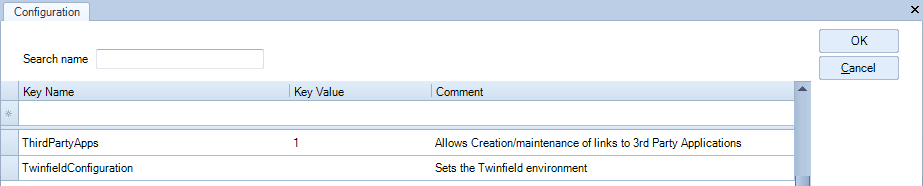
The Configuration opens listing default and/or existing key names, key values, and comments. -
To add to the listing, in the Key Name field enter the name of the configuration key.
-
Enter the value for the configuration in the Key Value field.
-
Enter identifying information in the Comment field.
-
Click OK to close the Configuration tab.
-
Log off and log back in to CCH Centra for the Configuration key to take effect.
Enabling other Applications to run with CCH Central
There will be situations where a configuration key is required to run third party applications, solutions and add-on or to run CCH applications or specifc CCH licences.
When an application has a link with any CCH module or a specifc funcionality is hidden behind a configuration key, then the key should be added to File > Maintenance > User Defined > Configuration.
Configuration keys are developed and improved over time. New configuration keys are shipped with new releases when necessary.
When linking CCH with other applications please refer to CCH guide on the specifc application (for example CCH OneClick or Twinfield) as those will give more information on configuration keys.
If you any question regarding configuration key you can also contact CCH Support.