
Editing Periods
The software offers the flexibility to edit both: Periods of Account (POAs) and Accounting Periods (APs) You can edit periods at any point during tax return preparation, before sign-off and submission to HMRC.
Editing Accounting Periods
You can edit both Accounting Periods (APs) and Periods of Account (POAs). It is possible to edit periods at any point during tax return preparation, before sign-off and submission to HMRC. There are certain conditions which apply to changing periods. Some data is mandatory (warnings are displayed). Some data may be lost (warnings are displayed).
- Selected and open the client you wish to edit
- Navigate to the Tax Returns Tab
- Click the Edit APs link alongside the P:OA you wish to Edit.
- In the Editing Accounting Periods window, edit the dates.
- The period end dates can be edited.
If your changes create two or three accounting periods, additional rows appear in this window.
Edit Trade
If your changes create three accounting periods, the Edit Trade button is activated.
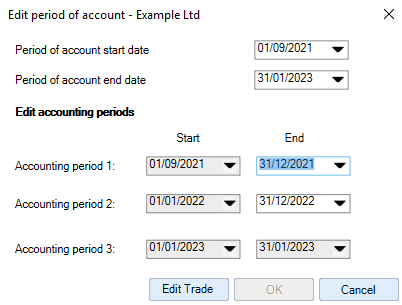
If you have created three accounting periods you cannot progress without either:
- Creating a trade (in a new client) or
- Editing an existing trade (in an existing client)
The Edit Trade button will open the Add/Edit Trade Information window.
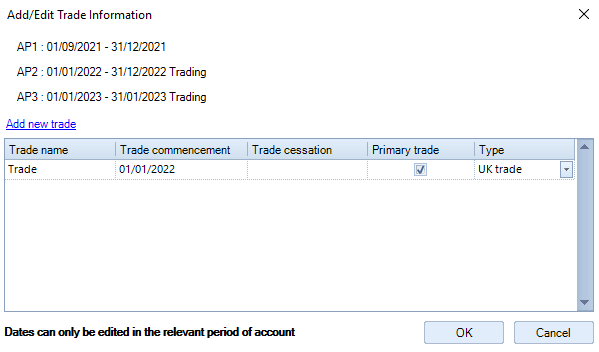
If no trade exists, add a new trade with a start or end date which ensures only 2 trading APs exist
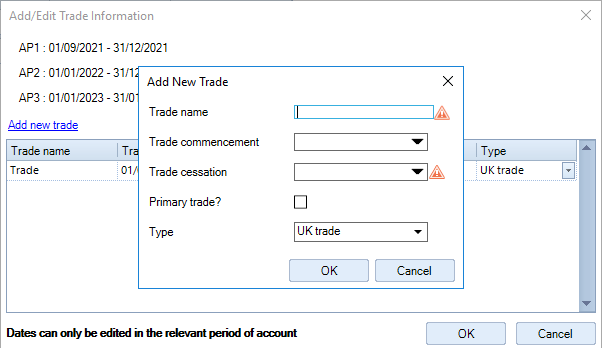
If there is already a trade, amend the start or end dates to ensure only two trading accounting periods exist
- Once the acceptable dates have been input, the OK button will be activated.
- Click OK - this navigates back to the 'Editing Accounting Periods' dialog box.
- Click OK to accept the AP date changes and the dialogue will close.
- You are then ready to click on the Period of account dates hyperlink to access the tax return.
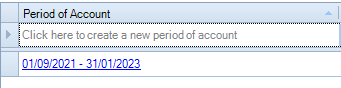
Note: Actions can be cancelled at any time by clicking the 'Cancel' button in the relevant screen.
You can edit both Periods of Account (POAs) and Accounting Periods (APs). It is possible to edit periods at any point during tax return preparation, before sign-off and submission to HMRC. There are certain conditions which apply to changing periods. Some data is mandatory (warnings are displayed). Some data may be lost (warnings are displayed)
Editing periods of account
Selected and open the client you wish to edit.
Click the Tax Returns tab.

Click the Edit POA link alongside the Period of Account you wish to Edit.
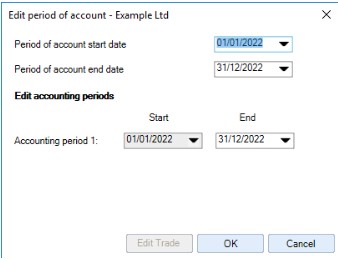
Edit POA allows you to change Period of Account dates.
It will only be possible to change the Period of Account start and end date where the dates entered do not straddle start and end dates of preceding or subsequent periods already created .
You cannot have 3 trading Accounting Periods in one Period of Account. If the date changes create 3 Accounting Periods, you cannot progress until you create or amend a trade providing a trade a start or end date to produce only 2 trading Accounting Periods.
If your revised POA start or end dates create 3 trading APs, see Editing Accounting periods (above)