
How To
Job Themes
CCH Accounts Production
Once a Theme has been created it will be applied to Clients through the Job Theme screen.
Introduction
CCH Accounts Production has a standard theme, but if this is changed it will then be applied to a or many clients. This will be actioned through this area.
Navigate to: File > Maintenance > Accounts > Job Themes
To apply Themes
From this screen is the option to apply a theme to all or a selection of jobs. The bespoke theme is then assigned to all clients or to individual clients and individual period ends depending on the choice made.
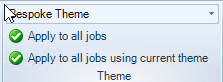
To apply to individual clients and or accounting periods, select the client e.g. Parent Limited and then click the theme from the drop down list e.g. Bespoke Theme. If the client has more than one accounting period the Theme may be applied to all or individual periods.

Link to: Themes: Themes
Related documents
CCH Accounts Production/iXBRL essentials training online (10133804)/(10133819)
This document outlines a course on using CCH Accounts Production software, aimed at helping new users efficiently produce statutory accounts. The course includes 1 x 2 hour session and 1 x 3 hour session focusing on practical skills such as setting up accounting periods, importing trial balances, and navigating the software. It is designed for all employees involved in preparing statutory accounts. Training is conducted in an interactive environment called CloudShare, with additional resources available online for further learning and support.
CCH Accounts Production: essentials training online (10133819)
This document outlines a course on using CCH Accounts Production software, aimed at helping new users efficiently produce statutory accounts. The course includes two 2-hour sessions focusing on practical skills such as setting up accounting periods, importing trial balances, and navigating the software. It is designed for all employees involved in preparing statutory accounts. Training is conducted in an interactive environment called CloudShare, with additional resources available online for further learning and support.
CCH Accounts Production 2026.3 Hotfix: Release Notes
Release Notes for CCH Accounts Production 2026.3 Hotfix
CCH Accounts Production 2026.3: Release Notes
Release Notes for CCH Accounts Production 2026.3
CCH Accounts Production 2026.2: Release Notes
Release Notes for CCH Accounts Production 2026.2