Run the software using one of the shortcuts provided:

From the Desktop clipboard_e8035c16cd423cc9563fe033bb7b23b4e.png

From the Start menu clipboard_e00aec9a9aec259b244fc2dfb03a44c48.png

You can also use Windows Explorer to double click on the program file, InteractiveChecklist.exe.

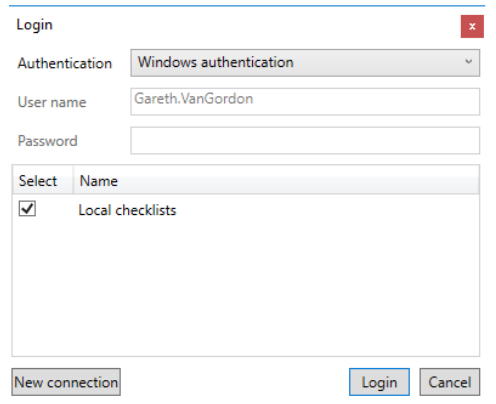
On loading the software, you will be presented with the Login dialog:
clipboard_ef73cc7ebd4dcd58196581e5d39ce2df6.png

With Windows Authentication, you can log into IDC automatically using the details you used to log into Windows, and this is the mode that most users will use. However, if you have more than one person using a computer, it is possible to log in using Application authentication and this allows you to enter your user name and password for IDC irrespective of the user who is currently logged into Windows. More information is provided about this in the section dealing with user management.

In the example shown in the above dialog, we have 2 connections available to us, one to a database stored on the local computer and one to a database stored in a network server at the office.

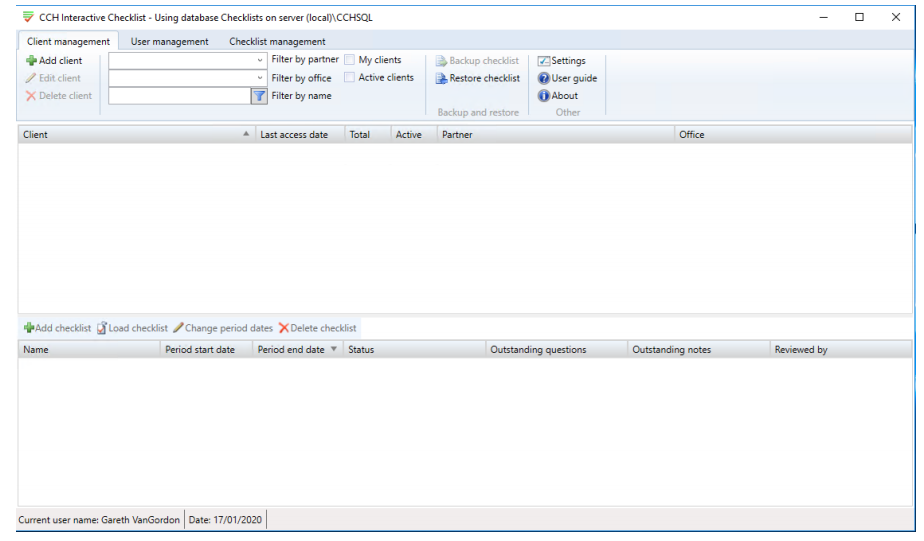
Select the database you wish to log into by ticking the checkbox to the left of the name of the connection and click on Login. You will be presented with the main window of the application.
clipboard_ed6fbd45c5eafc25b4ed49a446578e12e.png

Related documents

CCH Interactive Checklist video 4 – Filtering and Review
The document provides a video on CCH Interactive Checklist: Filtering and Review
CCH Interactive Checklist video 2 - Client Management
The document provides a video on CCH Interactive Checklist: Client Management
CCH Interactive Checklist video 1 - Introduction
This video provides an introduction to CCH Interactive Checklist
CCH Interactive Checklist video 3 – Tailoring and Completion
The article provides a video on CCH Interactive Checklist – Tailoring and Completion
Get Started
The document is a user guide for CCH Interactive Checklist, providing essential information and resources to help users get started. It includes links to various sections such as installation, user management, client management, and checklist completion. Additional resources feature guides for SQL database management, including backup and restore procedures. Furthermore, the document offers video tutorials covering key topics like introduction to the software and client management.
