
Preparing returns for online filing
CT600 Page 1 settings
Information is required for page 1 of the CT600 Tax return:
Tax reference/UTR. (The data entry field is located on the Main tab of the client in Central.)
Company registration number or other identifying number such as the Charity number. (The data entry field is located on the Main tab of the client in Central.)
The software automatically assumes that accounts and computations for the accounting period are being attached as in most cases a tagged set of accounts and computations are required for online filing.
There are exceptions to this where either one or both may not be required for example a long period of account where the Period of Accounts (POA) differs from the Accounting Period (AP).
For these cases ensure correct options are selected and a reason given under Tax Return Information > Main Return Data in the Data Navigator.
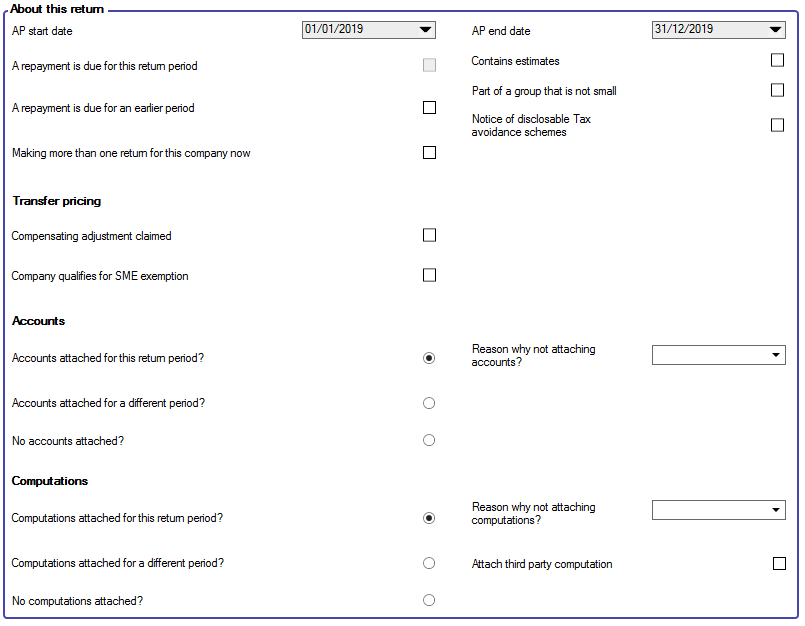
If No accounts attached? to the return for the accounting period is selected, choose a Reason why not attaching accounts? from the list of reasons in the box.
If the company type is one where a PDF set of accounts can be sent then indicate that accounts are attached and select the reason PDF accounts attached with explanation from the Reason list.
If No computations attached? to the return for the accounting period is selected, choose a Reason why not attaching computations? from the list of reasons in the box.
Data validation
Any errors that would prevent a successful online submission are indicated by the presence of Online filing errors seen in the Errors & exceptions panel at the bottom of the screen.

The Online filing specific errors are shown as a white exclamation mark within a red circle. The presence of these errors will not prevent you from accessing the online filing area but they will prevent you from generating the IR Mark required for the online submission to be successful.
To resolve the errors, click on the message. This will take you to the data entry window on which the error arises.
Once the error is resolved the message will disappear from the panel seen at the bottom of the working area.
If no errors remain you can proceed to create the submission.
Setting up Online Filing Credentials is in Maintenance for credentials to be applied globally or the Employee record if individually.