
How To
The New Report and The Change Report Window
CCH Central
CCH Smart Reports allow you to quickly assemble or edit a report - this is very useful for creating ad hoc reports. A report is always based on a template, so when you change a report you are doing so in a predefined template. A template contains a definition of headers, footers and margins into which you can add the data.
Options
The tools and buttons that are displayed in the New Report and in the Change Report window are used as follows.
|
Icon/Button |
Purpose |
| REPORT TASKS | |
 Run (F5) Run (F5) |
Runs the report. |
 Save Save |
Saves the new or edited report. |
 Edit in designer Edit in designer |
Opens the Report Designer window. |
| REPORT OPTIONS | |
 Summary only Summary only |
Click this box to run the summary of the report only. |
 Export to Excel Export to Excel |
Opens the report in Excel where cells will have formulas when applicable. The file will not contain any format from the Edit in designer. |
| FIELDS | |
 Standard Standard |
Lists the Central standard fields available for the category and subcategory where the report is located. |
 Addresses Addresses |
Lists the types of address fields vailable for the category and subcategory where the report is located. |
 Teams Teams |
Lists the team fields available for the category and subcategory where the report is located. |
As you assemble a report , click and drag fields into your report from the Field Chooser window.
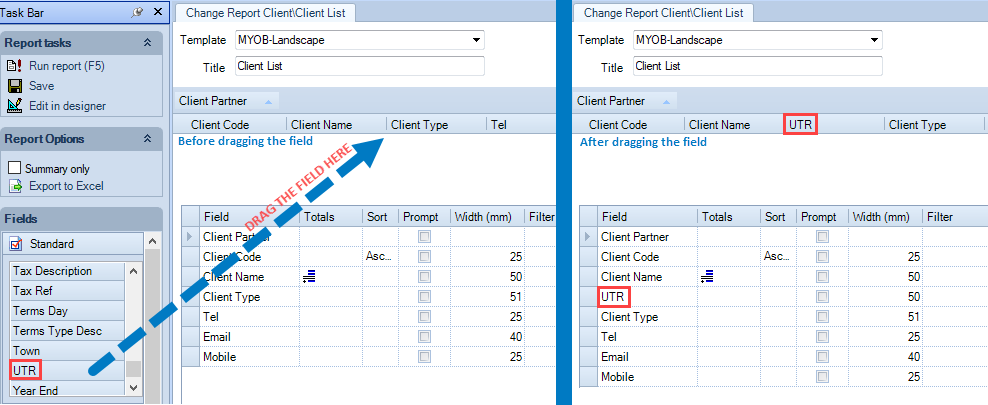
The field area is composed of columns and rows, and the listing below explains the purpose of each.
| Name | Purpose |
| Field | The name of the field. |
| Totals | The way in which data is to be totalled. You are able to choose to include the sum, count, average, minimum and/or maximum for a group and/or the report as a whole. |
| Sort | Data can be sorted by any field within a report. Alphabetic fields are sorted A to Z, numeric fields are sorted in ascending order. |
| Prompt | You can design the report such that when a user runs the report they are prompted to specify which data values to include in the report. |
| Filter | A report can have filters included in the design so as to limit the report’s contents to particular data values. Up to five data values can be specified using the Or columns. |
Related documents
CCH Central Suite Update Guide (Latest Offline Version)
The document outlines the process for using the Central Suite Installer Offline (CSI Offline) for customers with specific IT requirements that prevent internet updates. It provides detailed instructions for installing updates to the Central Suite, including necessary prerequisites, folder structure, and the installation steps. Key points include ensuring Microsoft SQL Server is supported, confirming .NET Framework requirements, and the importance of backups before starting the update. The document also highlights the need for administrator rights, handling database upgrades, and checking for office plugin updates, particularly for users of CCH Document Management.
CCH Central Suite 2026.3 Update Guide
This guide explains how to update an existing install of the CCH Central Suite to the latest version 2026.3 (including Service Packs and Hotfixes) using the Central Suite Installer (CSI).
CCH Central 2026.3 Release Notes
CCH Central 2026.3 Release Notes
Central Suite Installer (CSI) instructions
The document announces the update of the Central Suite Installer (CSI) for the CCH Central Suite, now compatible with the latest releases and service packs and hotfixes of various CCH applications. Key points include prerequisites for installation, compatibility information, and the necessity for proper backup before proceeding with the update. It highlights specific requirements for Microsoft components, and it warns users of CCH Accounts Production regarding regional settings for date format. Support options are mentioned for users seeking assistance during the update process. Release notes are accessible for detailed information on the updates.
CCH Central 2026.210 Service Pack
CCH Central 2026.210 Service Pack