Advance Search

CCH Reporting has been designed to return raw data; consequently filtering must be used to return meaningful reports.  This feature has been adapted from CCH Central's Advanced Search.

Useful Information!  CCH Reporting returns all contact records, to return client only records, apply the following filter.
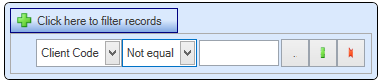
AdvanceSearch.png

When applying a filter only selected fields are available.  If a field is only to be used for filtering purposes, add the field, right click, and set the field to Show/hide.  This is the same as removing the visible tick within Step 2 of the wizard.

Parameters

The following is a list of available parameters.
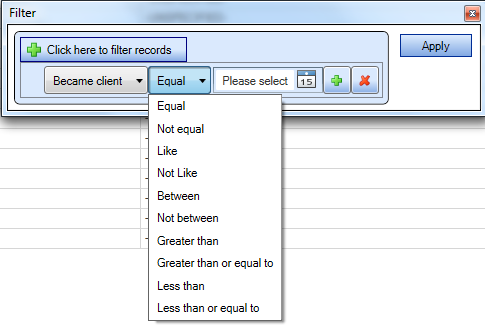
Parameters.png

Grouped Filters

It is possible to perform multiple grouped filtering to support complex conditions.

E.g. where the (Contact Type is “other individual” and Became Client after “01/01/2000” and Business Type = “Solicitor”) OR (Contact Type is “LLP” and Business Type = “Solicitor”)

Select GF_ClickHereToFilterRecords.png to return a group header; the GF_PlusSign.png returns the sub group query.

In the example below, section 1 is run.  Followed by section 2 and the results returned.
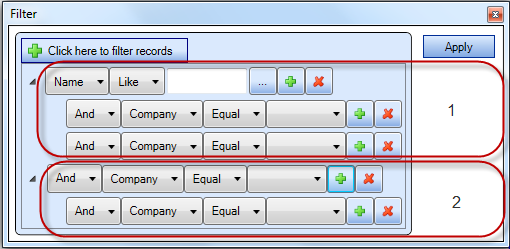
GF_RunningFilter.png

Click GF_RemoveSign.png to remove the query line.  If selected at the group header level the relevant sub queries are also removed.

Related documents

CCH Central Suite Update Guide (Latest Offline Version)
The document outlines the process for using the Central Suite Installer Offline (CSI Offline) for customers with specific IT requirements that prevent internet updates. It provides detailed instructions for installing updates to the Central Suite, including necessary prerequisites, folder structure, and the installation steps. Key points include ensuring Microsoft SQL Server is supported, confirming .NET Framework requirements, and the importance of backups before starting the update. The document also highlights the need for administrator rights, handling database upgrades, and checking for office plugin updates, particularly for users of CCH Document Management.
CCH Central Suite 2026.3 Update Guide
This guide explains how to update an existing install of the CCH Central Suite to the latest version 2026.3 (including Service Packs and Hotfixes) using the Central Suite Installer (CSI).
CCH Central 2026.3 Release Notes
Central Suite Installer (CSI) instructions
The document announces the update of the Central Suite Installer (CSI) for the CCH Central Suite, now compatible with the latest releases and service packs and hotfixes of various CCH applications. Key points include prerequisites for installation, compatibility information, and the necessity for proper backup before proceeding with the update. It highlights specific requirements for Microsoft components, and it warns users of CCH Accounts Production regarding regional settings for date format. Support options are mentioned for users seeking assistance during the update process. Release notes are accessible for detailed information on the updates.
CCH Central 2026.210 Service Pack