
Assignments, Assignment Templates and Assignment Template Groups
Assignments
An assignment is the chargeable or non-chargeable work carried out by the practice.
Chargeable assignments are carried out for a client. Some examples could be:
- Compliance
- Tax
- Accounting
- Financial Planning
Non-chargeable assignments are associated with the practice. Some examples could be:
- Sick leave
- Study
- Time adjustment — University, etc.
- Public holiday
All work done is recorded against an assignment whether carried out for a client or associated with the practice. A client must have at least one assignment so that you can record work against it.
Assignment Templates
If you were to only maintain individual assignments, you would find that you would repeat assignments time and time again for one or more clients. By setting up assignment templates, you can save time, maintain costs and ensure consistency in the workflow.
As a result, an assignment template comprises assignments that are used time and time again for clients. You can then select an assignment template that is applicable for the type of work needed by the client. An assignment template is also set up to include practice overheads and practice non-chargeable time.
Sometimes you will find that there isn't a suitable assignment template available for the work you need to do for a client. In these circumstances, you will need to create a unique assignment to cover the type of work needed.
The Assignment templates are located: File, Maintenance, Assignment, Assignment Templates.
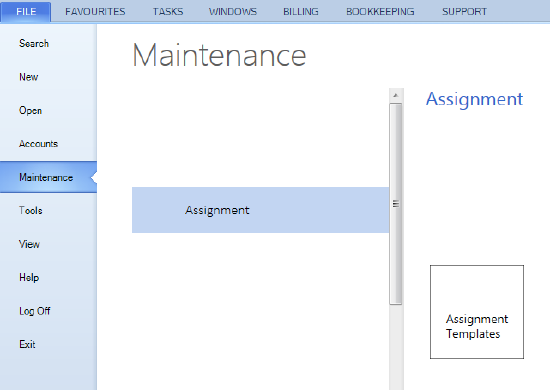
Assignment Templates Groups
An assignment template group is used to create a logical group of assignment templates. The group may define templates by a particular business unit, by types of clients, or perhaps by location. Your practice defines how they set up an assignment template group and system administration will maintain it.
Some examples of a different assignment template groups:
A business unit assignment template group:
The practice has several business units of which one is called Financial Services who carry out superannuation, financial planning and personal tax work.
If you have clients who repeatedly request for this sort of work, you could create an assignment template group of:
- Superannuation
- Financial Planning
- Personal Tax
A client profile assignment template group:
You have three types of clients — individual, company and trust.
For an individual, the assignment template group could comprise:
- Superannuation
- Tax Planning
- Personal Tax
For a company, the assignment template group could comprise:
- Financial Planning
- Business Development
- Business Tax
For a trust, the assignment template group could comprise:
- Business Tax
- Audit