
How To
Budgeting for spending plans
CCH Accounts Production
Budgets
To create a budget within CCH Accounts Production:
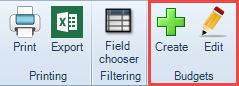
Select Budgets from the Reference folder in the Task Bar list, and click Create from the ribbon.
The Add Budget box will open:
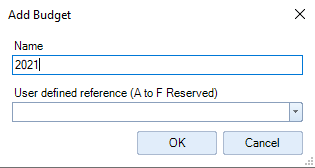
- Enter the budget Name e.g. 2021 and if you want to feed details through to the Financial Statements then also enter/select a reference from the *User defined reference field/drop-down.
- Click OK.
- A new budget column appears on the grid with the budget name entered.
- Enter the figures in the budget column.
*The Reference field relates to the user defined codes that are shown when a format is edited. These references are used within Accounts Production formats, e.g. to return current year figures "a" is used and for comparative figures "b" is used. Codes A to F are reserved and G to Z are available for use by users of the software.
Related documents
CCH Accounts Production/iXBRL essentials training online (10133804)/(10133819)
This document outlines a course on using CCH Accounts Production software, aimed at helping new users efficiently produce statutory accounts. The course includes 1 x 2 hour session and 1 x 3 hour session focusing on practical skills such as setting up accounting periods, importing trial balances, and navigating the software. It is designed for all employees involved in preparing statutory accounts. Training is conducted in an interactive environment called CloudShare, with additional resources available online for further learning and support.
CCH Accounts Production: essentials training online (10133819)
This document outlines a course on using CCH Accounts Production software, aimed at helping new users efficiently produce statutory accounts. The course includes two 2-hour sessions focusing on practical skills such as setting up accounting periods, importing trial balances, and navigating the software. It is designed for all employees involved in preparing statutory accounts. Training is conducted in an interactive environment called CloudShare, with additional resources available online for further learning and support.
CCH Accounts Production 2026.3 Hotfix: Release Notes
Release Notes for CCH Accounts Production 2026.3 Hotfix
CCH Accounts Production 2026.3: Release Notes
Release Notes for CCH Accounts Production 2026.3
CCH Accounts Production 2026.2: Release Notes
Release Notes for CCH Accounts Production 2026.2