How to create a Share Scheme

Step 1 of 2

A wizard guides you through the share scheme creation process.

  1. Open the Share Schemes section.

  2. Select Click here to create a new share scheme.
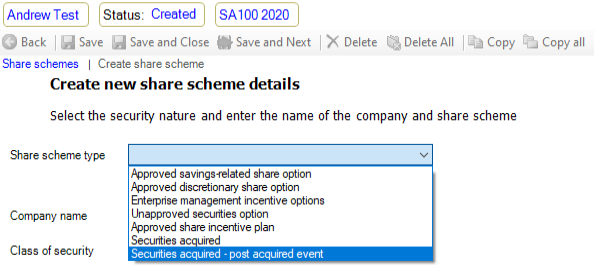
    The create a new share scheme wizard appears.
      Personal_Tax_Tax-Return-Data-Entry_Share-Schemes_Create-a-Share-Scheme_1.png

 3. Complete the following:

  • Share scheme type - Select the type of share issued by the company.
  • Company name - Enter the name of the company issuing the shares.
  • Class of security - Select the share class.

Note: You can add additional classes to the Class of Security pull-down using Common Tax Descriptions.

  1. Click Next. The Select the nature of the event step appears.

  2. From the Share option event type pull-down select one of the following:

  • Exercise options
  • Cancellation or release
  1. Click Next. The Create share scheme summary appears.

  2. Verify that you have entered the correct details and then click Finish.

Step 2 of 2

The information that you enter within the Share Schemes wizard populates some of the fields within Securities options, such as the company name and share class.

To Add Security Options

  1. If the shares are unlisted, then you should select the Is security unlisted check box.

  2. Complete the Exercise Option fields.

  3. Enter any taxable amounts.

  4. Do one of the following:

  • Click Back
  • Click Save and Close.

Related documents

CCH Personal Tax 2026.2: Release Notes
Release Notes for CCH Personal Tax 2026.2
CCH Personal Tax: End User Data Entry Training (10091177/10091176)
The CCH Personal Tax End User Data Entry Training offers a comprehensive, 3-hour interactive session focused on the creation, filing, and maintenance of SA100 tax returns. Participants will learn data entry processes for various income sources, production of tax computations, and online filing procedures. The course is designed for new users of CCH Personal Tax, provided through a standardized virtual environment via CloudShare, ensuring hands-on interaction. Pre-requisites include knowledge of CCH Central and personal taxation. Additional resources such as eLearning courses, videos, and webinars are available for further learning.
CCH Personal Tax: Partnership Tax and Trust Tax Training (10091200)
CCH Personal Tax: Partnership and Trust Tax Training. This 3-hour session covers data entry, client maintenance, tax return creation, and online filing.
CCH Personal Tax: Partnership Tax Training (10091178)
The document outlines an interactive online training session focused on the tax return data entry process for creating and filing tax returns. Lasting up to 3 hours, it aims to equip participants with knowledge on managing client records, producing tax computations, and ensuring compliance. Key topics include client record creation, data entry for various income sources, and the online filing process. Designed for new users of CCH Partnership Tax, attendees are expected to have a good understanding of CCH Central. Additional resources for further training are also provided.
CCH Personal Tax: Trust Tax Training (10091179)
This document outlines an online training session focused on the data entry process required for tax returns. It includes creating and maintaining client information, producing tax computations, and ensuring accurate tax filing. The session lasts up to 3 hours and aims to equip participants with skills in managing tax return data and client records. Key topics cover the creation of trust client records, data entry for various income types, and the online filing process. It is designed for new CCH Trust Tax users with prior knowledge of CCH Central.