Creating Accounting Data for a Client
If the client does not exist in Central go to: Adding a new Client:
Creating Accounting Data for a Client for the first time
To create accounting data for a client that already exists in CCH Central but for which no accounting period exists:
- From within the Client's screen in Central, select the Accounts Production tab and then click into the input row bearing the message Click here to add new Accounting Period, as indicated below.

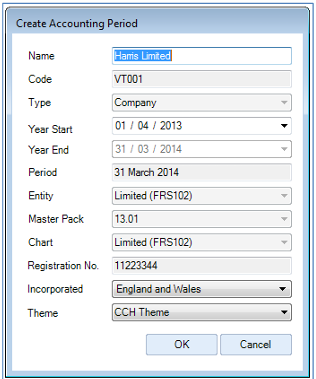
- Select / enter details in the Create Accounting Period window as described below.
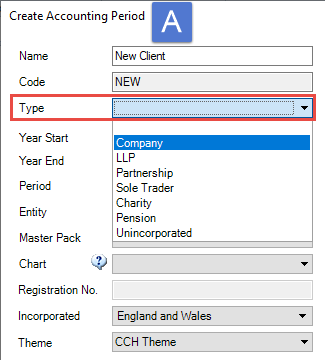
(i) Select the required Type from the drop down list. In the example below the Type is Company as seen in screen shot A.
The Types available are Company; LLP; Partnership (used for Medical only, for all other partnerships use Unincorporated); Sole Trader - do not use - use Unincorporated); Charity; Pension and Unincorporated.
It is important to select the correct Type and Entity. The selection dictates the chart of accounts, statutory database and financial statements for the entity. The Entity cannot be switched from within CCH Accounts Production unless changing from e.g. FRS 102 to FRS 105 when running the finalise and year end option.
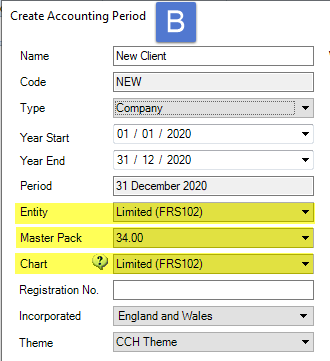
(ii) Once the Type has been chosen, the Entity; Master Pack and Chart fields will be populated. in B below, the Entity Limited (FRS102) is shown.
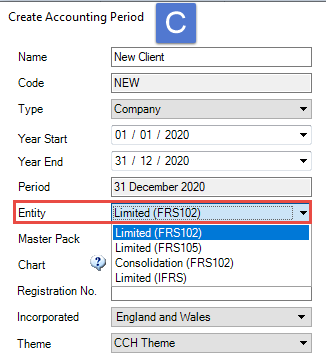
(iii) If an alternative Entity is required from that displayed, select from the drop down list, for example if setting up a Limited (FRS105) entity, see C below.
(iv) The Chart for the Entity will be displayed, if you require an alternative to that displayed, for example if you require the Limited Farm (FRS102) chart of accounts, select from the drop down list.
(v) Do not change the Master Pack, the default will be the latest published master pack.
(vi) Enter other relevant details such as Year start. The Year End and Period will automatically default to a 12 month period, If not shown enter the Registration No. unless not relevant for the entity selected e.g. an Unincorporated entity, the Country of Incorporation if not the default, and Theme if not using the default.
3. Click the OK button to finish.
Comparative data for a client with accounting data
If you have created the first accounting period that you are going to process, you may need to create the prior period(s) to hold the comparative data - see Note below.
Note: if you import trial balances for multiple years into this first accounting period within the Import screen in Accounts Production, then the prior periods will be created for you.
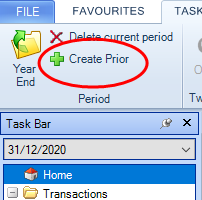
- Within Accounts Production, select the Home screen,at the top of the Task Bar list, then from the top ribbon, click Create Prior.
- In the Create Accounting Period window, the fields will be populated in line with the period you are in. If required ,change the Name, Year Start, Incorporation and Theme.
- The other fields are not available for edit.