In this section we will cover how to create a New Company based on an existing template. A company is defined as an independent set of accounts.

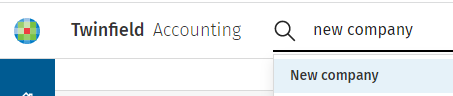
In the search everything bar enter New company and select the option.

clipboard_e9908da47b95d5f87e0a1491ae840a690.png

clipboard_ed25fdb66c59b53556d33ebf661fda33f.png

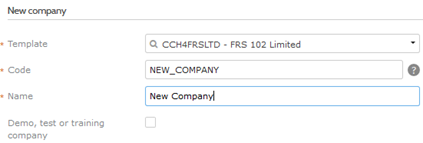
The 'New Company’ window will be displayed and the following fields are mandatory: 

Company template:

Company code:

Company name:

Double click in this field to view all templates/companies.

All companies created must have a code i.e. AB1000.

Enter Client/Customer.

Click‘Create’ for the new company to be created, a popup message with a link to your new company will appear on the Twinfield homepage.

Click the settings icon.  clipboard_e095b5136a40e9a9ab2fcd402d497a8a6.png

Select company settings.

clipboard_e7031fc4f1d105158aec07d9001da2cf4.png

Followed by the company settings icon.

clipboard_eaebe575e0fccdca5052226d77f78835f.png

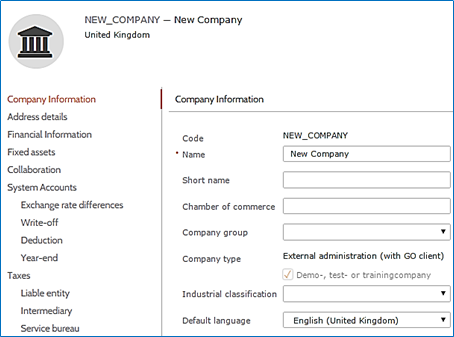
Click the options on the left hand side bar, this will take you to the relevant ‘company settings’ section.

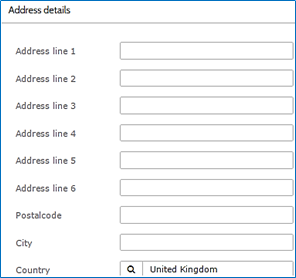
Enter ‘company name/short name’.

clipboard_ea01b54823f94f11a88a8dcf92e844baf.png

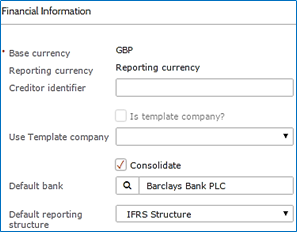
Set a default bank account

clipboard_efb07ca279c879c69e292441fd313d33a.png

clipboard_e0496e83a54f0ebfccea61c9d69a19a52.png

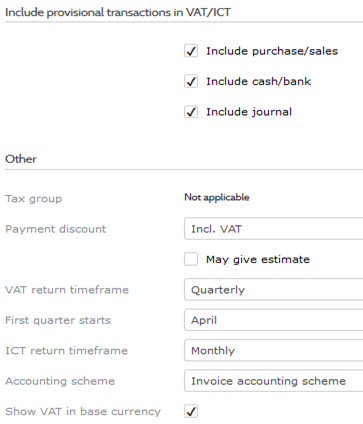
Click on the tab ‘Taxes’ and for example enter the following:-

VAT Number:     272757531

Name:                 Enter company name

Phone No.:         0845 533 3831

VAT time frame: Quarterly

clipboard_e0bb381c9ee06ea43551042fd44c17e74.png

To watch our video on creating a new company click here.

Related documents

Cheques and Paying-in slips
Cheques and Paying-in slips.
Twinfield: Twinfield Analysis Consultancy (10091307)
This document outlines a training course on Twinfield accounting software, designed for Twinfield partners and subscribers. The course, lasting up to 3 hours, focuses on enabling participants to leverage their Excel expertise to manipulate TwinCube data for creating comprehensive financial reports. Key objectives include processing transactions and searching via the reporting module. The session covers various topics such as data cube management, Excel formula building, and conditional formatting. Attendees must have advanced Excel skills and their own devices to join the session, as the course is tailored for Microsoft Windows users.
Twinfield Consultancy (10093303/10080551)
This document outlines a consultancy service for Twinfield users, targeting both partners and subscribers. It emphasizes collaborative sessions aimed at improving operational efficiencies and best practices through tailored advice and process reviews. Conducted online or onsite over two 3-hour sessions, the consultancy covers topics such as reporting, VAT reporting, and reconciliations. Attendees are expected to have a solid grasp of double entry bookkeeping. Additional resources, including eLearning courses, videos, and webinars, are provided for further learning.
Twinfield: Integration Consultancy (10095230/10095228)
This document outlines a consultancy-led course focused on the Twinfield accounting software, designed to assist businesses in managing their financials effectively. The course consists of four interactive sessions—each lasting three hours—covering navigation, invoicing, credit management, transactions, and reporting. Aimed at Twinfield partners and subscribers, participants are expected to have a good understanding of bookkeeping principles. Additional resources such as eLearning courses, videos, and webinars are also provided to enhance learning. The maximum group size is six delegates.
Twinfield: PM Integration Consultancy (10091304/10091303)
This document outlines a training course for Twinfield accounting software users, focusing on its integration with CCH Central. The course consists of four sessions, each lasting about three hours, aimed at enhancing attendees' bookkeeping skills and knowledge of both systems. Key objectives include familiarization with CCH Practice Management and Twinfield, as well as hands-on experience with financial processes such as invoicing, bank transactions, and VAT reporting. Prerequisites include a good understanding of CCH Central and appropriate permissions. The course is intended for Twinfield partners and subscribers, with a maximum of six delegates per group.