
How To
Creating Periodic Reporting Periods
CCH Accounts Production
Reporting periods will be created depending upon user requirements, e.g. monthly, quarterly, or half yearly. These interim dates are important; the year-end reporting period will have already been set by the software.
Creating the reporting periods
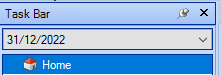
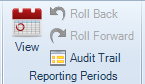
- From the top ribbon on the Accounts Production home screen, select View, which will open the Reporting Periods window.
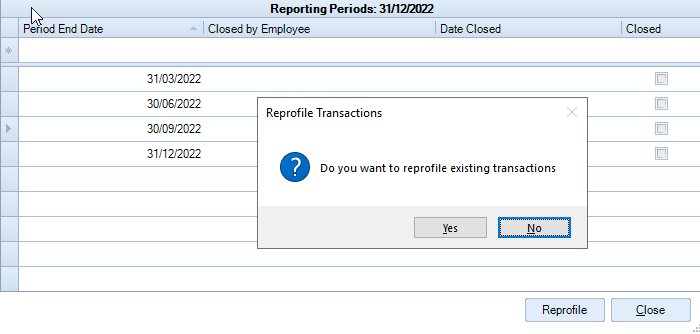
- In the Reporting Periods window, enter the Period End Dates, e.g. the quarter-end dates.
As each Period End Date is entered, the system will give the option to reprofile existing transactions, this will automatically allocate any existing transactions to the appropriate accounting period based on their date.
If there are no transactions, or they all fall in the first reporting period, all reporting periods will remain open. If there are existing transactions and any fall in periods after the first period, the system will automatically close any earlier periods.
When the period end dates have been entered Close this box.
Deleting a reporting period
To delete a period within the Reporting period window, click on the relevant row and use the delete key on the keyboard.
Reporting periods may be created at the start of the year or as and when they are needed. We recommend that there at least two open reporting periods in existence up to the year-end.
Related documents
CCH Accounts Production/iXBRL essentials training online (10133804)/(10133819)
This document outlines a course on using CCH Accounts Production software, aimed at helping new users efficiently produce statutory accounts. The course includes 1 x 2 hour session and 1 x 3 hour session focusing on practical skills such as setting up accounting periods, importing trial balances, and navigating the software. It is designed for all employees involved in preparing statutory accounts. Training is conducted in an interactive environment called CloudShare, with additional resources available online for further learning and support.
CCH Accounts Production: essentials training online (10133819)
This document outlines a course on using CCH Accounts Production software, aimed at helping new users efficiently produce statutory accounts. The course includes two 2-hour sessions focusing on practical skills such as setting up accounting periods, importing trial balances, and navigating the software. It is designed for all employees involved in preparing statutory accounts. Training is conducted in an interactive environment called CloudShare, with additional resources available online for further learning and support.
CCH Accounts Production 2026.3 Hotfix: Release Notes
Release Notes for CCH Accounts Production 2026.3 Hotfix
CCH Accounts Production 2026.3: Release Notes
Release Notes for CCH Accounts Production 2026.3
CCH Accounts Production 2026.2: Release Notes
Release Notes for CCH Accounts Production 2026.2