Journal Data Entry

Each journal type has their own numbering sequence; the first four digits denote the year the transaction was posted into. 
Journals can also be imported into Twinfield using various file formats i.e. XLS, CSV, XML. 
A brief overview of the journal types are listed below.
Opening balances Journal, posts transactions into period zero only.
Year End Adjustments & (2) post years end amendments into period 55 only.


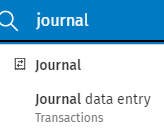
Type  ‘Journal’ in the 'Search Everything' area on the blue ribbon bar. clipboard_eca90a0ce569d50890017a127e6a11603.png
clipboard_edff3ebaf0f402e372bfaaf7a0f823951.png 
Select Journals data entry from the drop down list.

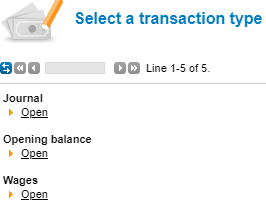
Click open under Journal.
clipboard_ed5bc4e8f15bff89e5cb935cd7bee1b3f.png

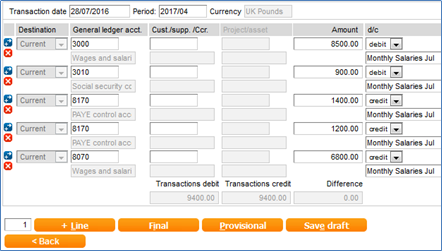
The following information has been entered on the ‘Journal’.

Transaction date,

GL Code, Amount and Description.

clipboard_e2d1107dd91a2beabecfe434000b7a00b.png

Error posting warnings common throughout Twinfield

Red Dot: -    User is unable to post the transaction Provisional or final.
Orange Dot: - When posting the warning message is displayed outlining the field red, this error message can be overridden click either Provisional or final.
Green Dot: -  Saved.
 

+ Line, This function adds one or more empty transaction lines and automatically saves the transaction lines as draft. 
Provisional posted transactions update the ledgers and can be amended.
Final posted transactions can only be amended by entering a journal.


To watch our video on dimensions click here.

Related documents

Cheques and Paying-in slips
Cheques and Paying-in slips.
Twinfield: Twinfield Analysis Consultancy (10091307)
This document outlines a training course on Twinfield accounting software, designed for Twinfield partners and subscribers. The course, lasting up to 3 hours, focuses on enabling participants to leverage their Excel expertise to manipulate TwinCube data for creating comprehensive financial reports. Key objectives include processing transactions and searching via the reporting module. The session covers various topics such as data cube management, Excel formula building, and conditional formatting. Attendees must have advanced Excel skills and their own devices to join the session, as the course is tailored for Microsoft Windows users.
Twinfield Consultancy (10093303/10080551)
This document outlines a consultancy service for Twinfield users, targeting both partners and subscribers. It emphasizes collaborative sessions aimed at improving operational efficiencies and best practices through tailored advice and process reviews. Conducted online or onsite over two 3-hour sessions, the consultancy covers topics such as reporting, VAT reporting, and reconciliations. Attendees are expected to have a solid grasp of double entry bookkeeping. Additional resources, including eLearning courses, videos, and webinars, are provided for further learning.
Twinfield: Integration Consultancy (10095230/10095228)
This document outlines a consultancy-led course focused on the Twinfield accounting software, designed to assist businesses in managing their financials effectively. The course consists of four interactive sessions—each lasting three hours—covering navigation, invoicing, credit management, transactions, and reporting. Aimed at Twinfield partners and subscribers, participants are expected to have a good understanding of bookkeeping principles. Additional resources such as eLearning courses, videos, and webinars are also provided to enhance learning. The maximum group size is six delegates.
Twinfield: PM Integration Consultancy (10091304/10091303)
This document outlines a training course for Twinfield accounting software users, focusing on its integration with CCH Central. The course consists of four sessions, each lasting about three hours, aimed at enhancing attendees' bookkeeping skills and knowledge of both systems. Key objectives include familiarization with CCH Practice Management and Twinfield, as well as hands-on experience with financial processes such as invoicing, bank transactions, and VAT reporting. Prerequisites include a good understanding of CCH Central and appropriate permissions. The course is intended for Twinfield partners and subscribers, with a maximum of six delegates per group.