CCH Corporation tax makes widespread use of grids for data entry and display. This section details how to work with these grids.

Entering data into grids

Grids display data in tabular format characterised by rows and columns. The data is displayed in rows with a context-sensitive number of columns containing pre-determined column titles.

clipboard_e5c8fad5314cb15ad22d818996a72318e.png

You are able to use the tab key to navigate through cells in grids once you are in the first cell.

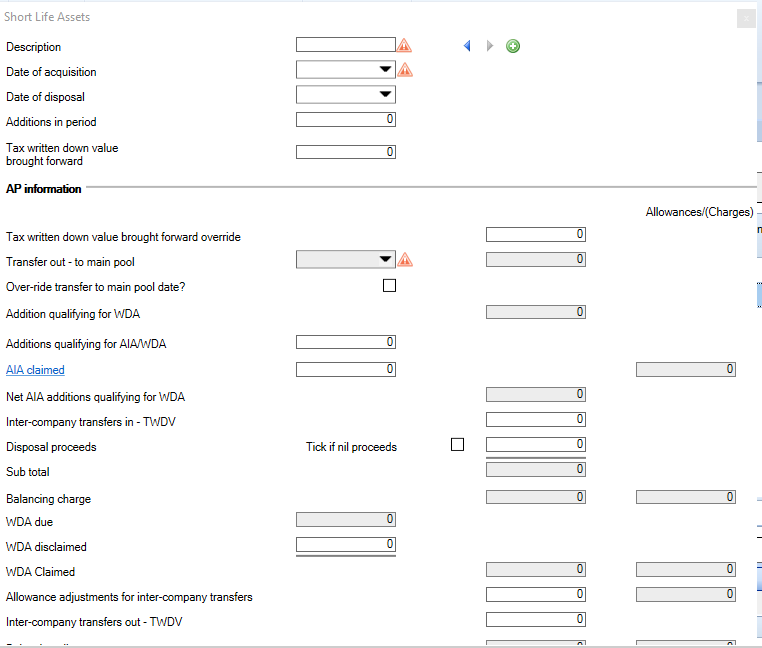
In some grids, clicking on this first cell will launch a separate window into which you must input your data eg. Short life assets, Other assets, BPRA.
clipboard_e5a2f347819e9d569317b2d0ee778d3cc.png

White fields are editable fields.

Grey fields are un-editable and will be automatically populated with system-calculated values.

Description fields will allow input of alpha-numeric values.

Fields with a downward arrow contain a pick list, from which values should be chosen.

Date values can be manually entered or input using the arrow to display the date picker.

Some grid cells contain an elipsis icon 
clipboard_e19c438ae692ffe5f7afb709cb2db3fd9.png
 which allows you to search and select other data from other areas in the software e.g:

The company fields in CT600C Claims and surrenders to group relief.

The participator name in CT600A - Loans to participators.

Some grids are effectively a summary of data entered into underlying screens via 'secondary analysis'.

Related documents

CCH Corporation Tax 2026.3: Release Notes
Release Notes for CCH Corporation Tax 2026.3
CCH Corporation Tax 2026.2: Release Notes
Release Notes for CCH Corporation Tax 2026.2
Getting Started
This document provides a quick start guide for using CCH Corporation Tax software. It outlines essential features such as the Data Navigator, which assists in completing clients' Returns, and the use of Breadcrumbs for navigation. Additionally, it explains the functions available in the Ribbon panel located at the top of the screen. Overall, the document aims to streamline the user experience by highlighting key tools and navigation methods within the software.
Non Trade Loan Relationships
This document outlines topics related to Non Trade Loan Relationships in corporate tax computations. It includes links to sections on Non Trade Loan Relationship Summary, Credits, and Debits, detailing how to input and summarize these tax-related items in the Data Navigator. Each section describes the process for entering data and how totals are summarized for reporting purposes. Additionally, it links to related topics like Foreign Income and Miscellaneous Income.
Document Publishing
This document outlines the options for electronically storing tax returns and computations using CCH Document Management and CCH OneClick. It emphasizes that access to these tools requires appropriate licenses and user rights. Users can publish tax returns and computations both in draft form for client review and at various stages in the submission process to HMRC. The document includes specific links to guides on how to publish documents using both systems.