
How To
Entities
CCH Accounts Production
Use Entities to hide entities not currently in use and / or to re-order the listing.
Hiding Entities not in use
To hide entity types which are old or unused Navigate to: File > Maintenance > Accounts > Entities
- Entities may be hidden to avoid the risk that work is carried out in an old entity, which is no longer supported in the software or is not used by your organisation.
- These may be un-hidden again, if necessary, and any existing accounting periods that use the old entities will continue to be visible and accessible.
- From the Entities screen tick the 'hidden' field.
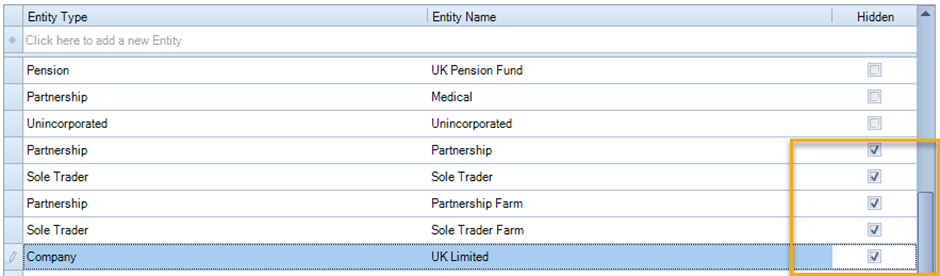
When setting up the accounting period for an Unincorporated entity for the first time - do not use Partnership or Sole Trader use Unincorporated. If the Partnership and Sole Trader Entity Type are hidden on this screen it will prevent them being used. However, Partnership and Sole Trader will NOT be hidden from the list on the set-up screen. Creating Accounting Data for a Client
Note: In some instances this may mean that you are unable to Year End due to hidden entities.
To re-order the list of entities
Navigate to: File > Maintenance > Accounts > Entities
- From within this screen drag the entity up or down the list to re-sequence it.
- The new sequence will be reflected in various drop-down lists within the CCH Accounts Production.
- This is advantageous as it effectively sets the default entity type during Client creation.
- The default Company entity is Limited (FRS102).
Related documents
CCH Accounts Production/iXBRL essentials training online (10133804)/(10133819)
This document outlines a course on using CCH Accounts Production software, aimed at helping new users efficiently produce statutory accounts. The course includes 1 x 2 hour session and 1 x 3 hour session focusing on practical skills such as setting up accounting periods, importing trial balances, and navigating the software. It is designed for all employees involved in preparing statutory accounts. Training is conducted in an interactive environment called CloudShare, with additional resources available online for further learning and support.
CCH Accounts Production: essentials training online (10133819)
This document outlines a course on using CCH Accounts Production software, aimed at helping new users efficiently produce statutory accounts. The course includes two 2-hour sessions focusing on practical skills such as setting up accounting periods, importing trial balances, and navigating the software. It is designed for all employees involved in preparing statutory accounts. Training is conducted in an interactive environment called CloudShare, with additional resources available online for further learning and support.
CCH Accounts Production 2026.3 Hotfix: Release Notes
Release Notes for CCH Accounts Production 2026.3 Hotfix
CCH Accounts Production 2026.3: Release Notes
Release Notes for CCH Accounts Production 2026.3
CCH Accounts Production 2026.2: Release Notes
Release Notes for CCH Accounts Production 2026.2