Fund Set Up
Fund Set Up
The Funds window provides a means of separately identifying groups of holdings within a client's investment portfolio. Each client can have up to 99 funds.
An example of their use might be:
- Fund 1 = Personal Investments and Investment Account
- Fund 2 = Lloyds Basic Deposit Investments.
If applied to a Trust, each Fund could equate to a different Trust Fund.
For CGT purposes, each Fund is treated as unique and separate from one another but it is possible to specify a Consolidation Account that aggregates the specified funds together for CGT purposes.
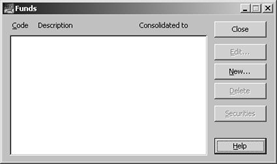
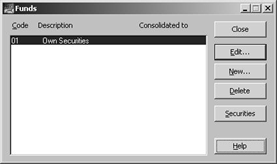
From the Clients window, click Data Entry, the following window appears:
|
Close: |
Closes the funds window. |
|
Edit: |
Amends details of the selected fund. |
|
New: |
A new fund is set up using this option. |
|
Delete: |
Deletes a fund, its securities, and all underlying transactions from the client's ledger. |
|
Securities: |
Adds securities to the selected fund. |
|
Help: |
Accesses the online help facilities. |
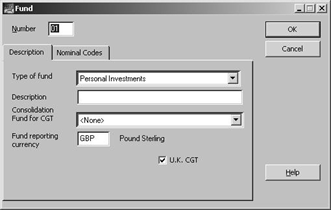
Click New, the following window appears:
|
Type of Fund: |
This field specifies the type of fund. Use the pick list to select the relevant type from the system defined types. Note: This is used to identify where the income etc derived from the fund is to appear in SA Tax Returns. |
|
Description: |
Used to provide a description for the fund to be used within reports etc. Can be up to 40 characters. Solution 6 recommends that an entry is made (e.g. personal or Lloyds Basic Deposit etc) for ease of identification. |
|
Consolidation fund for CGT: |
This field is used to specify another Fund (by its number) into which all transactions are consolidated for CGT purposes. None of the transactions are physically moved but the CGT system treats all linked funds as one for CGT purposes. This field is often used when the income needs to be separately identified, and reported, but consolidated CGT treatment is required. You can use the pick list of the available funds. Note: You cannot consolidate a fund into another fund that is itself consolidated into a further fund. |
|
Fund reporting currency: |
Allows you to select the Fund Reporting Currency from those set up within the Common Database. F2 displays the List Currency Codes window allowing the selection, amendment or addition of a Currency Code. The Fund Reporting Currency is used by the Investment Schedule report to define the reporting currency. |
|
UK CGT: |
This flag is used by the Capital Gains Tax routines to determine whether this fund is to be included in the CGT calculation routine. |
|
Nominal Codes: |
This feature is a remnant of an earlier facility that has now been superseded. At some point in the future the nominal codes tab will be removed. |

Mr Roberts has the following funds:
|
Fund No |
Fund Type |
Name |
Consolidated for CGT |
|
1 |
Personal Investments |
Own Securities |
N/A |
|
2 |
Personal Investments |
Joint Securities |
Fund 1 |
|
3 |
Personal Investments |
Life tenant of Granny's Will Trust |
N/A |
The completed window for the first fund is as follows:
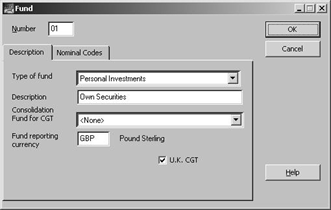
Click OK. You are returned to the summary window:
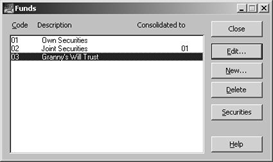
After setting up the other funds, summary window is as follows: