The Product Licence Information screen displays the products and modules that you are licensed for. It enables you to find the CCH version and manage the licences and PIN.

It is found under main menu File > Help > About > Product Licence Information.
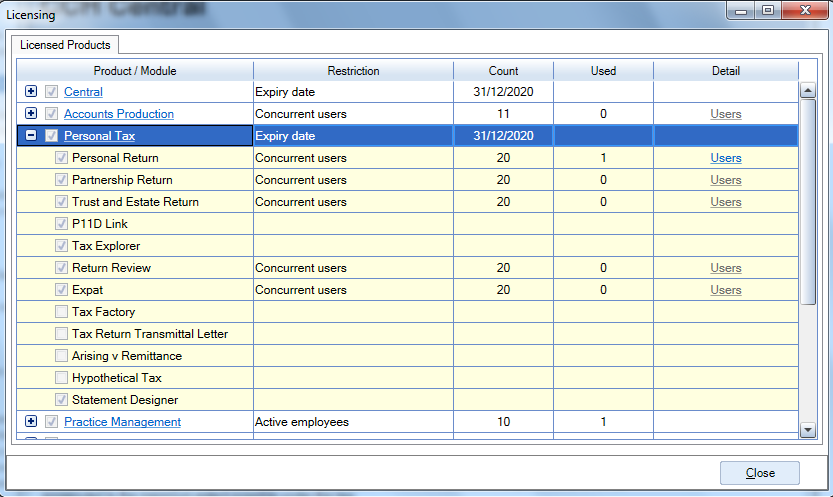
LicensedProducts.png

Clicking the plus sign against a product displays the modules within it. In the screen above the plus sign has been clicked for Personal Tax.

Product/Module All products and modules that run in Central are shown here, whether you have bought them or not. (The only exceptions are certain modules that are no longer actively sold.) Some module names are underlined to indicate a link. These links take you to marketing information on CCH’s website.

Restriction Licensing is implemented by means of restrictions, e.g. on how many users can access a product. The Restriction column shows the restriction for a product or module. Some products or modules may have more than one restriction.

Count This column quantifies the restriction, e.g. by giving an expiry date or number of concurrent users.

Used For some restrictions, it is useful to show how much has been “used”. For concurrent users, the number of concurrent users in a product is shown here. Above we can see 1 user is in Personal Tax's Personal Return.

Detail If a link is shown in this column it gives more details for the licensing method. If a product is licensed on concurrent users then it shows the users that are currently in the product. If a product is licensed on a pay-as-you-go basis it shows the history of credits purchased.

Related documents

CCH Central Suite Update Guide (Latest Offline Version)
The document outlines the process for using the Central Suite Installer Offline (CSI Offline) for customers with specific IT requirements that prevent internet updates. It provides detailed instructions for installing updates to the Central Suite, including necessary prerequisites, folder structure, and the installation steps. Key points include ensuring Microsoft SQL Server is supported, confirming .NET Framework requirements, and the importance of backups before starting the update. The document also highlights the need for administrator rights, handling database upgrades, and checking for office plugin updates, particularly for users of CCH Document Management.
CCH Central Suite 2026.3 Update Guide
This guide explains how to update an existing install of the CCH Central Suite to the latest version 2026.3 (including Service Packs and Hotfixes) using the Central Suite Installer (CSI).
CCH Central 2026.3 Release Notes
Central Suite Installer (CSI) instructions
The document announces the update of the Central Suite Installer (CSI) for the CCH Central Suite, now compatible with the latest releases and service packs and hotfixes of various CCH applications. Key points include prerequisites for installation, compatibility information, and the necessity for proper backup before proceeding with the update. It highlights specific requirements for Microsoft components, and it warns users of CCH Accounts Production regarding regional settings for date format. Support options are mentioned for users seeking assistance during the update process. Release notes are accessible for detailed information on the updates.
CCH Central 2026.210 Service Pack