
How To
Reverse Depreciation
Twinfield
Reverse Depreciation
It is possible to reverse depreciation within the fixed asset module, this creates a system journal in the financials for the reversal.
Click the tick box for the individual asset.

Select the 'Reverse depreciation' option.
This will display the following information which will need to be completed to process your reversal.
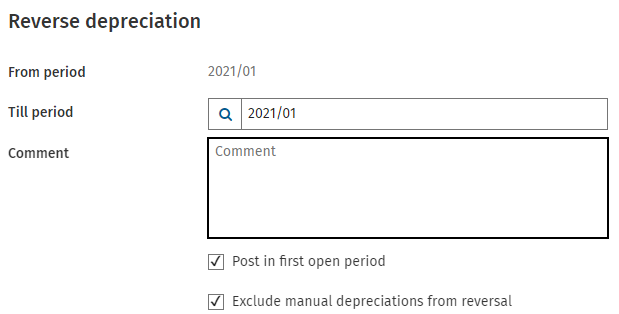
| From period | This is the last period of depreciation. This period cannot be changed. |
| Till Period | Define the period for the asset reversal. Please note: The transaction can be reversed back to the first period of use. |
| Comment | Add a reason for the reversal. |
| Post in first open period | If a period is closed during manual depreciation, the transaction will be posted in the first open period. |
| Exclude manual depreciation from reversal | Tick this option if you wish to exclude any manual depreciation calculated from being reversed. |
To complete the process click 'Reverse'.
Related documents
Cheques and Paying-in slips
Cheques and Paying-in slips.
Twinfield: Twinfield Analysis Consultancy (10091307)
This document outlines a training course on Twinfield accounting software, designed for Twinfield partners and subscribers. The course, lasting up to 3 hours, focuses on enabling participants to leverage their Excel expertise to manipulate TwinCube data for creating comprehensive financial reports. Key objectives include processing transactions and searching via the reporting module. The session covers various topics such as data cube management, Excel formula building, and conditional formatting. Attendees must have advanced Excel skills and their own devices to join the session, as the course is tailored for Microsoft Windows users.
Twinfield Consultancy (10093303/10080551)
This document outlines a consultancy service for Twinfield users, targeting both partners and subscribers. It emphasizes collaborative sessions aimed at improving operational efficiencies and best practices through tailored advice and process reviews. Conducted online or onsite over two 3-hour sessions, the consultancy covers topics such as reporting, VAT reporting, and reconciliations. Attendees are expected to have a solid grasp of double entry bookkeeping. Additional resources, including eLearning courses, videos, and webinars, are provided for further learning.
Twinfield: Integration Consultancy (10095230/10095228)
This document outlines a consultancy-led course focused on the Twinfield accounting software, designed to assist businesses in managing their financials effectively. The course consists of four interactive sessions—each lasting three hours—covering navigation, invoicing, credit management, transactions, and reporting. Aimed at Twinfield partners and subscribers, participants are expected to have a good understanding of bookkeeping principles. Additional resources such as eLearning courses, videos, and webinars are also provided to enhance learning. The maximum group size is six delegates.
Twinfield: PM Integration Consultancy (10091304/10091303)
This document outlines a training course for Twinfield accounting software users, focusing on its integration with CCH Central. The course consists of four sessions, each lasting about three hours, aimed at enhancing attendees' bookkeeping skills and knowledge of both systems. Key objectives include familiarization with CCH Practice Management and Twinfield, as well as hands-on experience with financial processes such as invoicing, bank transactions, and VAT reporting. Prerequisites include a good understanding of CCH Central and appropriate permissions. The course is intended for Twinfield partners and subscribers, with a maximum of six delegates per group.