
Tax Payments
Liabilities and Payments
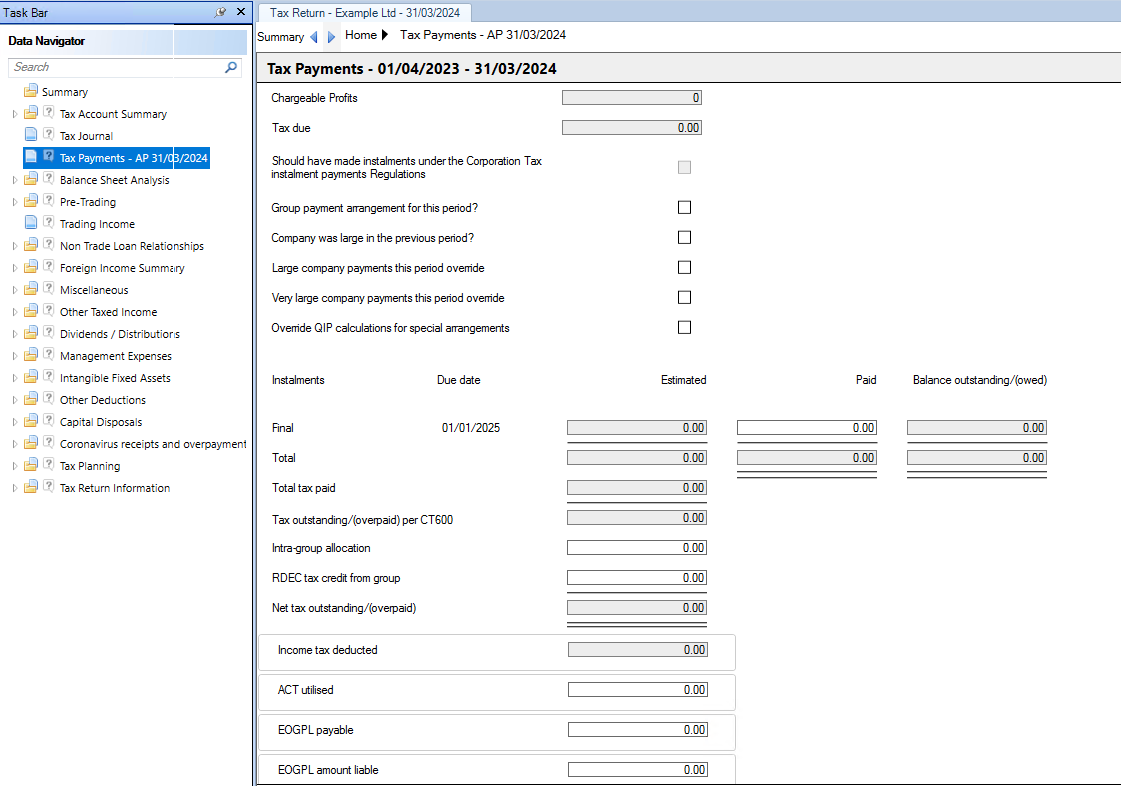
The Corporation Tax due and Due date(s) are calculated and shown int he Tax Payments section of the Data Navigator.
From Release 2025.3 onwards, Life Assurance Company Tax Credits can be included to populate box 555 on the CT600.

Should have made instalments under the Corporation Tax instalment payments Regulations is automatically completed in the 2nd and subsequent periods if the company is liable to make Quarterly Instalment Payments and the criteria to make Quarterly Instalment Payments is satisfied in the prior and current period.
Tick Group payment arrangement for this period? if the company is part of a Group where arrangements for the payment of liabilities for the group apply. This completes the relevant box on the form CT600.
Tick Company was large in the previous period? if the company was deemed large for the purposes of QIPs.
This check box is manual entry for the first period of account for a client in CCH Corporation Tax.
Following the first period of account all subsequent periods of account the software will calculate whether it is large for the purposes of Quarterly Instalments.
Tick Large company payments this period override?to ensure the correct instalment dates are displayed in the screen when a company is classed as Large for Quarterly Instalment payments.
Tick Very Large Company payments this period override? to ensure the correct instalment dates are displayed in the screen when a company is classed as Very Large for Quarterly Instalment payments.
The effect is the dates are four months earlier than if it were a large company. The purpose of these two override fields is to ensure the instalment dates are shown if they are not picked up by Central and Boxes 630/631 are completed as appropriate.
Tick Override QIP calculation for special arrangements to override the the 4 instalments being calculated into one instalment due 9 months after the accounting period end.
Enter amount(s) in the Paid column for any payments made against liabilities.
Intra group allocation - enter any amounts relating to payments or amounts received from group companies
Income tax deducted is automatically posted from the Other Taxed Income data input screen.
ACT Utilised - enter an amount of ACT you wish to utilise against liabilites. This completes the relevant box on form CT600.
EOGPL payable and EOGPL amount liable are entries for the Energy Oil and Gas Profit Levy, that are reported in Boxes 986 and 501.