
CCH Audit Automation: 2025.1 Release Notes
Release Highlights
This release provides a number of enhancements, minor quality improvements and latest master pack updates.
Prerequisites
Installing CCH Audit Automation 2025.1
This release is installed using the Central Suite Installer. This ensures that all prerequisites are in place and that all the products for which you are licensed are installed in the correct sequence.
Click here to find out more about the Central Suite Installer.
Offline Data
Any client data that has been taken offline should be traveled back to the office database before updating the system.
Software Enhancements
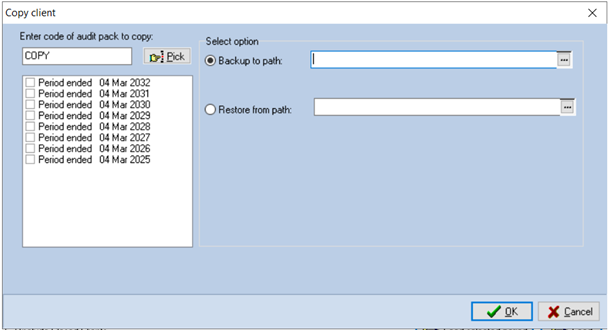
Backup of prior year data
The copy pack routine has been updated to allow the selection of an individual prior period instead of only the current or all periods. A selection of audit periods linked to the selected client will now be shown allowing selection of single or multiple prior periods. This update is to make it easier for firms wanting to isolate audit periods for file review.
Reset user count
The reset user count has been added to the screen where the warning is generated when working in the client. Previously it was necessary to close the client to access this routine. This should hopefully remove the annoyance of having to close and re-open the client.
Quality Improvements
Update missing checklists and audit programmes
A new button has been added to the utility menu to allow users to rebuild the checklists and audit programmes based on the master pack that the audit is linked to. This is to resolve a issue when the software is unexpectedly closed during the balance forward routine causing the audit checklists and programmes to be incomplete.
ITS/68111 (Audit Automation) - Release for editing symbol not appearing correctly
Previously in some scenarios the release for editing symbol would not appear correctly. This issue has been resolved.
ITS 68042: Non Audit Services checklist missing in independence questionnaires (C3)Fix Access violation error while accessing Audit program or signing it off
This issue is resolved.
Clear deleted data
This routine has been updated to resolve an issue where the pool tests where not getting removed correctly causing an error message to be generated.
Update Sub folder version after each balance forward
In some scenarios an issue was observed with the sub folder version when the audit period is balance forwarded. The balance forward routine has been update and the resulting error message will no longer be shown.
Master Packs
Mercia master packs
The master pack manual detailing the changes to the master packs can be located from the Mercia: Audit Manuals page along with the latest sections A-D of the manual.
Details of the latest Mercia changes can be downloaded here.
The following master packs have been included in the 2025.1 central suite installer:
MERPEN 13 - Mercia Pension audit pack version 13
MERLLP 13 - Mercia LLP audit pack version 13
PCAS master packs
The master pack manual detailing the changes to the master packs can be located from the PCAS: Audit Manuals page.
Details of the latest PCAS changes can be downloaded here.
The following master packs have been included in the 2025.1 central suite installer:
IPCAS 20 - PCAS Company master audit pack version 20
PAAPCH 18 - PCAS Charity audit pack version 18
PCASNA 18 -PCAS audit exemption version 18
CCH master packs
The master pack manual detailing the changes to the master packs can be located from the CCH: Audit Manuals page.
Details of the latest CCH master pack changes can be downloaded here.
The following master packs have been included in the 2025.1 central suite installer:
IFULL 16 - CCH Company master pack version 16
IGROUP 16 - CCH Group audit pack version 16
LAP 15 -CCH Limited assurance pack version 15
CCHCH17 - CCH Charity audit pack version 17
CCHLLP 15 - CCH LLP audit pack version 15
NONAUD25 - CCH Non audit version 25
Install
The above master packs have been made available for download and can be installed by logging into the audit software as system manager and selecting the install button from the master pack menu. Select the master pack to install via the check box and click install. Only licenced master pack will be avaliable for download.
Known Issues
Legal Notice
Disclaimer : Wolters Kluwer (UK) Limited has made every effort to ensure the accuracy and completeness of these Release Notes. However, Wolters Kluwer (UK) Limited, its staff and agents will not be liable for any errors or omissions and use of the software is subject to the customer’s licence with Wolters Kluwer (UK) Limited. These Release Notes should not be relied upon as a detailed specification of the system or the software. Wolters Kluwer (UK) Limited may make changes to these Release Notes from time to time. This is provided for informational purposes only. The information reflected in this document may be changed or updated without notice. Wolters Kluwer (UK) Limited may also make improvements and/or changes in its products, practices, and/or programs described in this document at any time without notice. This document should not be seen as a contractual agreement, a modification or amendment of any existing contractual agreement with Wolters Kluwer (UK) Limited, or an indication of terms of service. All technical data, specification and other information contained in this document is confidential and the proprietary intellectual property of Wolters Kluwer (UK) Limited and/or its licensors. No reproduction, copy, alteration, or distribution thereof may be made without the express written consent of Wolters Kluwer (UK) Limited.
Copyright: These Release Notes may not be copied, altered, edited, disposed of, or distributed without the prior consent of Wolters Kluwer (UK) Limited. The content is confidential. Unless indicated otherwise all elements of this software product are owned by Wolters Kluwer (UK) Ltd. © 2026 Wolters Kluwer (UK) Limited
Trademark Rights: Microsoft, Windows, Windows NT, Windows for Workgroups, Windows 98, 2000, XP, MSDOS, Windows Vista, Windows 7, Windows 8, Windows 10, Windows Server, Microsoft SQL Server, and Microsoft Office, are either registered trademarks or trademarks of Microsoft Corporation. Novell and NetWare are trademarks of Novell Inc. Citrix MetaFrame is a registered trademark or trademarks of Citrix Systems, Inc. All rights reserved. All other trademarks are the property of their respective owners.
Wolters Kluwer (UK) Limited,Wolters Kluwer House, 145 London Road, Kingston Upon Thames, Surrey, KT2 6SR