
How To
Automation: Ribbon bar - launching
CCH IXBRL Review And Tag
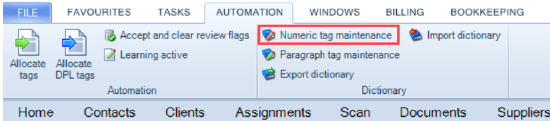
When CCH iXBRL is launched from CCH Accounts Production or from the Desktop, there is a ribbon under Automation menu.
When CCH iXBRL is launched from CCH Accounts Production or from the Desktop
When CCH iXBRL is launched from CCH Accounts Production or from the Desktop, there is a ribbon under Automation menu.

When CCH iXBRL is launched from CCH Central
When CCH iXBRL is launched from CCH Central, the options under Automation are shown under the menu Tasks.

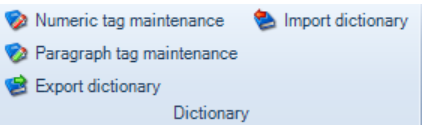
Paragraph Tag Maintenance (Dictionary)
- Click here to view Dictionary - Paragraph Tag Maintenance
Numeric Tag Maintenance (Dictionary)
- Click here to view Dictionary - Numeric Tag Maintenance
Related documents
CCH iXBRL Review & Tag: Training for Accounts conversion from MS Word and Excel (10133768)
This document outlines a training course for converting statutory accounts from Word and Excel into iXBRL format using CCH iXBRL Review & Tag. The course, lasting up to 3 hours, targets users needing to tag accounts for submission to HMRC and Companies House. Key objectives include understanding iXBRL requirements, importing documents, applying tags, and the submission process. Prerequisites include familiarity with accounts and having credentials for HMRC and Companies House. Additional resources such as eLearning courses and webinars are also provided for further learning.
CCH iXBRL Review and Tag 2026.1
The latest release of CCH iXBRL Review and Tag
View
The document outlines the features of a software interface with two main tabs: "CCH iXBRL Review and Tag" and "Companies House Submission." The first tab provides product version details and access to review and tagging settings, which are further explained in a linked system administrator guide. The second tab includes functionalities related to the Companies House licensed module, with an option to update the license if it has expired. Visual elements include images depicting the interface for clarity.
Introduction: Tagging Detailed Profit and Loss
The document outlines the process for tagging the Detailed Profit and Loss (DPL) statement for HMRC compliance, indicating that it must be submitted with either Accounts or tax computations, but not both. It specifies that CCH provides two options for tagging the DPL: via the CCH Corporation Tax return or using CCH iXBRL Review & Tag. Additionally, a link is provided for further instructions on tagging the DPL through the Corporation Tax method.
File
The document outlines functionalities related to file management in a software application. Key features include options to load files (including XML, Word, or Excel), save current documents, save documents under new names or locations, close open files, and access a list of recently worked files. These options enhance user efficiency and facilitate document organization.