Additions and Disposals are imported into Corporation Tax from the Fixed Asset Register for tax analysis.

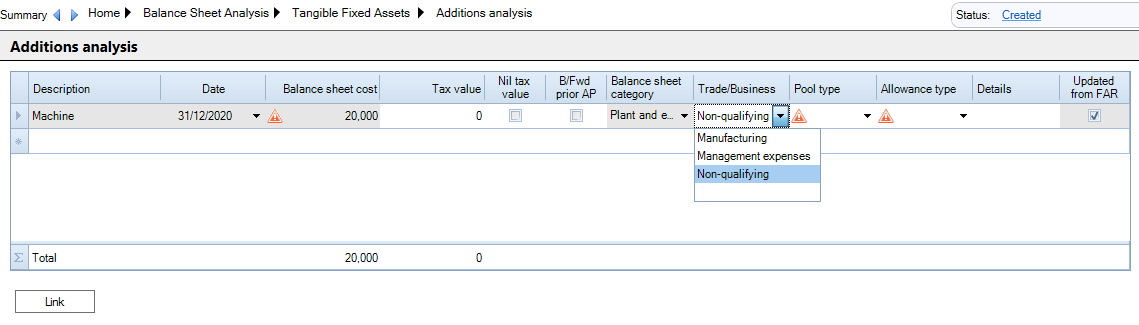
 The screen below shows a single Addition that has been imported from Fixed Asset Register.
clipboard_e57f03403cd01bcf38b7832b98e55a970.png

Fields imported from the Fixed Asset Register, such as the asset Description, Date and Balance sheet cost are greyed out. To change them you need to update the Fixed Asset Register.

When editing fields in Corporation Tax you need to enter the data and press Tab to move to the next column.

Enter the Tax Value of the addition if different from Balance sheet cost or select if Nil tax value.

The Balance Sheet category  comes from the asset's Asset Class. 

The Balance Sheet categories default  for large companies in the Master Asset Classes. The Balance Sheet categories on the Asset classes need to be edited for small companies. 

Select the Trade/Business, Pool Type and Allowance Type

Click the Link button to link all the additions to the Capital Allowances screen and clear Cost is not linked warrning.

The Updated from FAR column indicates that this Addition has been imported from the Fixed Asset Register.

If you make changes in Corporation Tax and then re-import the data from the Fixed Asset Register, your changes are not lost. When the new records are imported, the fields that came from the Fixed Asset Register are updated and your changes are retained.

To edit Fixed Asset Register imported fields  un-tick CCH Accounts Production link - Balance sheet for the relevant period of account on the Tax Links screen and select Update from Accounts in the top Ribbon.

Related

Related documents

Year End
The document outlines the procedure for performing a year-end in the CCH Fixed Asset Register (FAR). No special process is required, but the system prevents progression if the nominal ledger does not reconcile with the FAR or if an asset movement has occurred since the last depreciation posting. The system provides warnings at year-end but not at other times, such as when printing accounts. Users are advised to finalize accounts in CCH to prevent earlier period reconciling issues.
Updating CCH Personal Tax
Updating CCH Corporation Tax
Creating a Fixed Asset Register
The document provides instructions on how to access and set up the Fixed Asset Register within CCH Accounts Production. It outlines the steps to open an accounting period, configure asset code generation, and manage depreciation calculations. Users can customize settings on the Periods screen, and establish Asset Classes for various asset types, detailing associated nominal accounts for control and depreciation postings. The setup can be expedited using defaults from Master Asset Classes.
Posting Depreciation
The document outlines the process for managing depreciation within a system that automatically recalculates it after each asset movement. Users can generate a Fixed Asset Report and post depreciation entries back to CCH Accounts Production via designated options. Three journal entries are created: the Depreciation Journal, Revaluation Journal, and Profit/Loss on Disposal Journal, each serving specific accounting functions. The document also notes that rerunning the depreciation process replaces previous entries, and users must navigate away from the posting screen to view updated data in Accounts Production.