
Adding HMRC and Companies House credentials
For standalone and Central users of CCH iXBRL Review and Tag
In order to add the HMRC and / or Companies House credentials, you need to have system administrator rights, if you do not have please request assistance from your IT department/provider.
The steps to access the screen to add the credentials are:
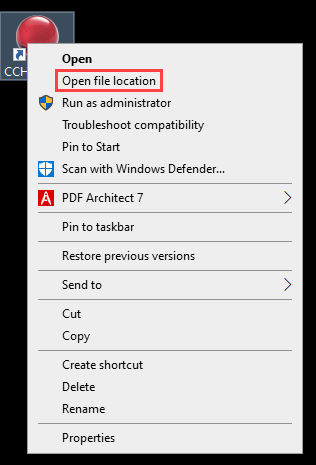
1. Right click on CCH Central or CCH iXBRL Review and Tag icon on the desktop and click Open File Location
2. Locate the file ReviewAndTagSettings.exe and double click on it to open.
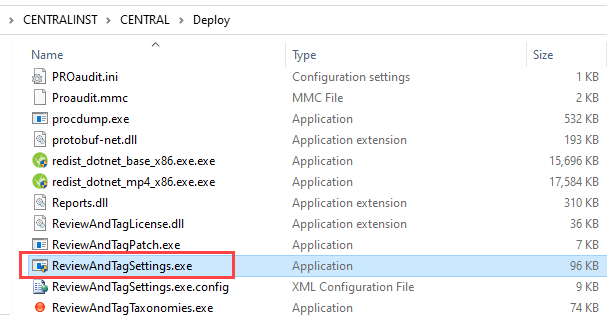
Allow the app to make changes if asked, enter a system administrator user name and password if asked.
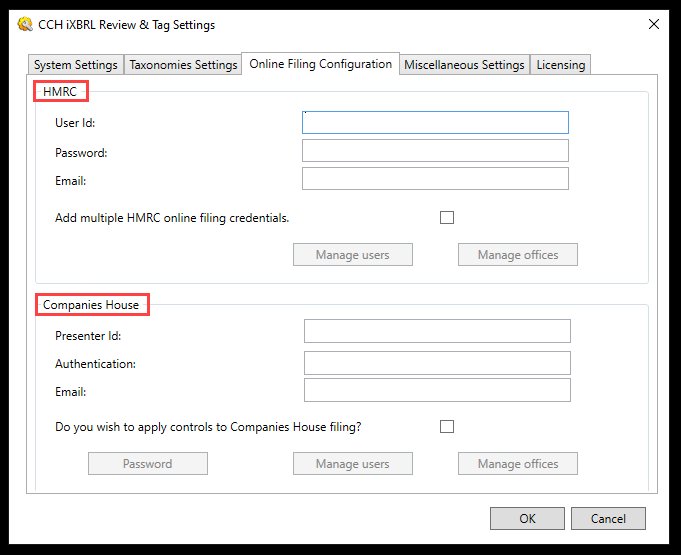
3. Click on the Online Filing Credentials tab to add the credentials
- For the HMRC section: you only need to add the letter A in the User Id field, the letter B in the Password field and a valid email address.
The software will access the HMRC test site only, therefore full credentials are not required. DO NOT add multiple credentials. - For Companies House: enter your Presenter Id, Authentication code and a valid email address. This is to allow you to file online provided you are licenced to do so within the software.
4. If you wish to restrict access to CCH iXBRL Review and Tag and/or restrict who can submit the Accounts to Companies House, then click on the box to apply controls to Companies House filing as below.
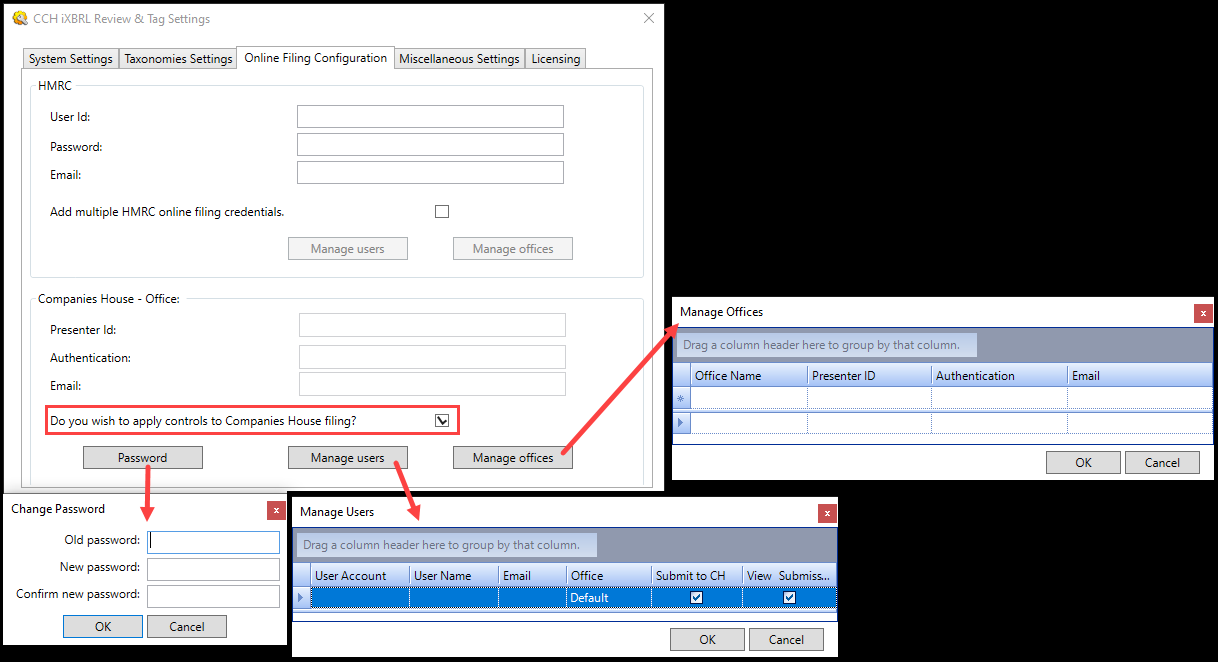
1. Create a password first, make sure you make a note of the password
2. Manage Users: add the employees's credentials* and click the boxes at the end of the line choosing whether they are going to Submit to Companies House and/or View Submissions
| User Account | Enter the Windows account name that the user uses to log into Windows. The system will use Windows authentication to identify the user from their Windows log in |
| User Name | The name of the user. This will be shown in the submissions databasein the Submitted by column. If filing controls are not in use then this column will show the users Windows account details |
| If you wish individual staff email addresses to be used when accounts are submitted to Companies House so that any queries from Companies House are directed to the member of staff responsible for the submission, complete this field with the user's email address. The office email address will be used for this user if the field is left blank. It is not therefore necessary to populate the email addresses if you wish to use a single office email address to receive queries | |
| Office | The office that the user is associated with. The first office in the list will be offered as a default and you can change this by selecting the office from the drop down list. The system will use the Presenter ID of the office that the user is allocated to when zthe user submits accounts together with the office email address if the user's email address is blank |
| Submit to CH | If this checkbox is ticked, the option to submit accounts to Companies House will be avaialble to the user |
| View Submissions | If this checkbox is ticked, the option to view the submissions database will be available to the user. If the previous checkbox is ticked for the user, you will not be able to remove the tick from this option |
3. Manage Offices: if the Practice has different ID presenter credentials for different Offices, add the credentials accordingly
*The employees credentials will be their windows credentials not their CCH login