
Assignment Details Page: WIP tab (CCH Practice Management)
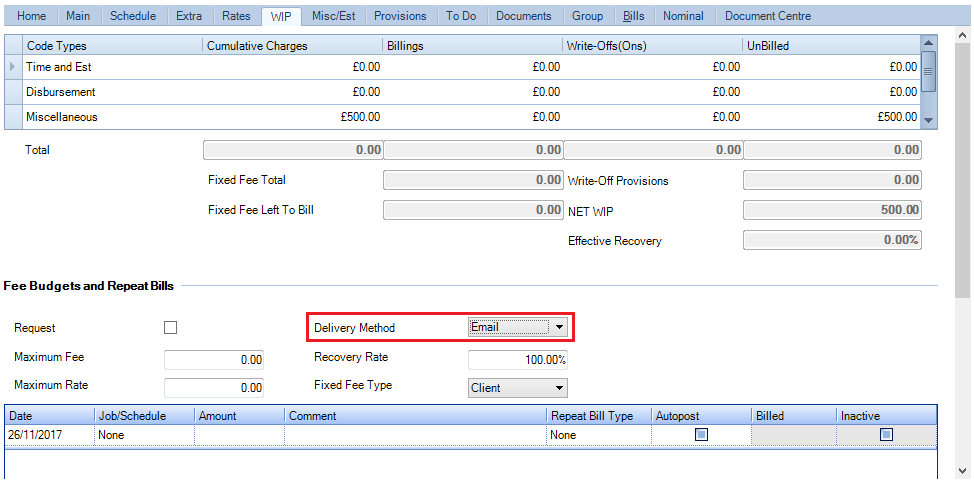
The WIP tab displays the transaction history of a work done for a client. It shows the transaction totals broken up over the categories of Time and Est, Disbursement and Miscellaneous. Clicking the WIP enquiry button on the Task Bar will provide detailed information about any one of categories.
Assignments – Delivery Method
Practices have the ability to set a delivery method at assignment level, which is used within the Billing Wizard.
Note: Once a bill is created and filed into CCH Document Management a workflow can be trigged to automate the process. Within this workflow, practices can choose whether to automate or manually send out invoices, whether by email, CCH OneClick or post.
Delivery Method availablity
The Delivery Method field is available within the following windows:
- Client > Bills Tab
- Billing > Draft Bills
- Billing > Bills Ready to Print
- Billing > VAT Invoices to Print
- Billing > VAT Invoice History
- Billing > Billing History
- Billing > Billing History by Partner
Assignments – Delivery Method Bulk Update
An option is available in the Bulk Update Wizard for Assignments called Delivery Method, giving users the ability to update the Delivery Method field from the Assignment screen > WIP tab > Fee Budgets and Repeat Bills section.
To bulk update the value of the Delivery Method field, select the assignments from the Find Assignments screen then click on Bulk Update option from the ribbon.
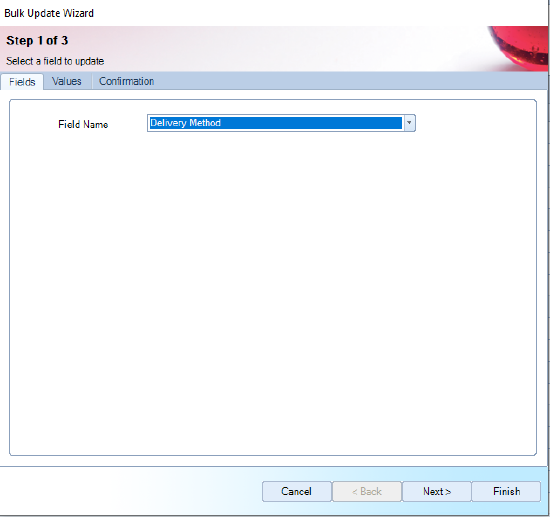
- In Step 1 of Bulk Update Wizard, select Delivery Method from the Field Name drop down list and click Next.
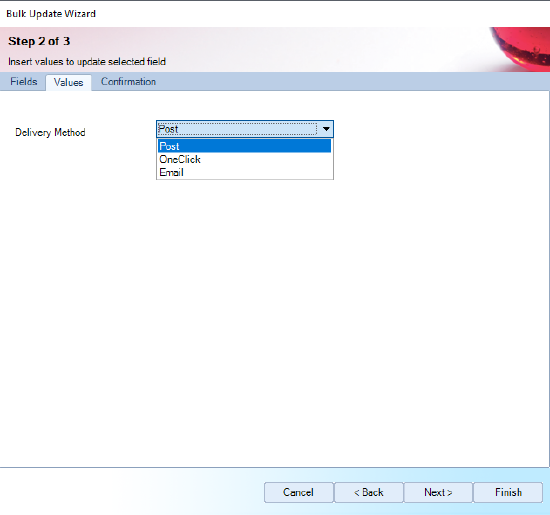
- In Step 2, set the value for the Delivery Method field and click Next.
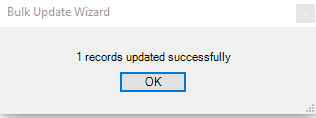
- Step 3, the Confirmation tab of Bulk Update Wizard, displays the number of records that will be updated. Click Finish to update the Delivery Method field for the selected assignments. If the Delivery Method field is successfully updated for all the selected assignments, the following dialog will be displayed:
Note: Delivery Method is a field included in assignments. The value set on this field at assignment level is used in Billing Wizard. After the bill is created and filed into CCH Document Management a Document workflow that contains the Check Delivery Method activity can be started. This activity checks the value of the Delivery Method set on the bill and depending on this value, the bill is then emailed to clients or published to CCH OneClick.
Ability to lock down delivery method
A Task Permission is available to enable practices the ability to lock down who can add a Delivery Method. The new task permission applies to the following areas:
- Client > Assignments > WIP Tab
- Assignment Templates > Billing Tab
- Billing > Draft Bills > Open Draft No > Master Paragraphs
- Find Assignments > Bulk update
The Task Permission is located within File> Maintenance > Security > Task Permissions.
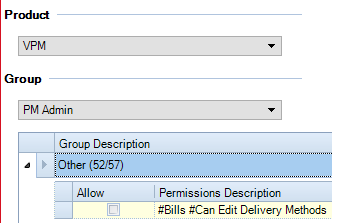
Note: If a user does not have the permission set, they are unable to set Delivery Methods.
Emailing Bills using Delivery Method
A workflow step Check Delivery Method combines with saving bills into CCH Document Management to allow firms to automate the generation and delivery of fee notes via email or CCH OneClick This is particularly useful for repetitive fixed fee services such as VAT and Payroll and can result in significantly reduced administrative overhead and faster cash collection.
Users can email to clients or publish to CCH OneClick the bills from CCH Practice Management by using the Check Delivery Method activity in a Document workflow. The Check Delivery Method activity checks the Delivery Method value set on the Billing Wizard and allows users to assign three outcomes corresponding to the values of the Delivery Method field: Post, Publish to OneClick or Email.
The value set on this field at assignment level is used in Billing Wizard. After the bill is created and filed into CCH Document Management, a Document workflow that contains the Check Delivery Method activity can be started. This activity checks the value of the Delivery Method set on the bill and depending on this value, the bill is then emailed to clients or published to CCH OneClick.
-------------------------------------------------------------------------------------------------------------------------------------------------------------------------------------------