This is where the amounts applicable to each employee are applied to the various charge rates used in your practice. All employees have a charge rate applied to them. These charge rates are then used to calculate the billable amount for a client, based on the time entered against them by an employee, multiplied by the chargeable rate of that employee (time X charge rate = billable WIP). An employee can have multiple charge rates, however they must be different charge rate types i.e. Standard, Premium, Discount etc

clipboard_eb89431b9ad31e530c366d0b22f4b4a77.png

The descriptions for these multiple charge rate types are configured by your system administrator. These charge rate types are then available for selection within the Charge Rates tab. The actual value attached to these charge rates is configured here on an employee by employee basis. For example, the charge rate of ‘Premium’ can be set up as a charge rate type by your system administrator. This rate is then selected for an employee in their Charge Rates tab and, for example. their Premium rate is set to £160. For another employee their ‘Premium’ rate can be set to £250 and for a partner it may be set to £350. The charge rates setup for each employee are then available for selection when time is being entered by them.

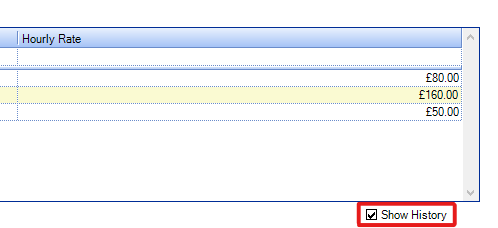
An employee's charge rates can be changed at any time. However, editing a rate in this tab will not update any timesheet entries that have already been created and are awaiting posting. It is recommended that the Start and End date fields are used when editing an employee's charge rates to clearly define when they are to be used. By default, only active charge rates will be displayed on the Charge Rates tab in an employee record. To see historic rates you can tick the 'Show History' tick box at the bottom left of the charge rates grid.
clipboard_ebc11098b3855dbff680fdfacb98a08db.png

Note:  You also can use special rates to allocate non standard rates to specific assignments. This is done through the Rates tab in the Assignment page.

The charge rates column is only displayed when entering timesheets if the setting to display it has been turned on in the timesheet ribbon. This is done in the Timesheet User Settings window.

Related documents

CCH Practice Management 2026.2: Release Notes
Release Notes for CCH Practice Management 2026.2
CCH Practice Management 2026.3: Release Notes
Release Notes for CCH Practice Management 2026.3
CCH Practice Management: enhanced - billing training online (10133815)
This document outlines a 3-hour training course on CCH Practice Management, focusing on the chargeable work process for clients. Participants will learn how to authorize timesheets, expenses, and disbursements, access prebilling reports, and utilize basic billing functionalities. The course is aimed at users involved in the billing process and requires prior completion of CCH Central and CCH Practice Management essentials courses. It will be delivered via an interactive environment called CloudShare. Additional resources such as eLearning courses, videos, and webinars are provided for further learning.
CCH Practice Management: essentials training online (10133814)
This course is designed for staff involved in completing Timesheets, Expenses, and Disbursements within the CCH Practice Management system. It covers the creation and submission processes, as well as utilizing CCH homepages for efficiency. Prerequisites include completed CCH implementations and internal agreement. The training lasts for two hours and is conducted via the interactive CloudShare platform. Topics include job structure, month-end processes, and practical hands-on exercises. Resources such as eLearning, videos, and webinars are also available to enhance learning.
Software and database installation (10091331)
This document outlines the installation process for software and a pre-configured database following an order confirmation. It emphasizes the importance of ensuring that the IT environment meets necessary hardware and software specifications, as well as the role of a Consultant in reviewing infrastructure and advising on deployment options. Key areas covered include SQL revisions, resource allocation for installations, workstation deployment methods, and scheduling installation access rights. Users are encouraged to review a hardware system requirements guide prior to installation discussions.