
Research and Development
This is where you can claim additional tax relief on expenditure on Research and Development including claims to the Above the Line Tax Credit on expenditure incurred on or after 1 April 2013.
Details of Research and Development expenditure can be entered in one of two ways:
- Detailed - using the data entry grid (Manual entry or link from Profit and Loss)
- Total expenditure only - using the Summary data entry area

Detailed method of entering data

A unique Description must be entered.
Select the Type of Expenditure from the dropdown menu which will determine the rate of relief applied to the expenditure.
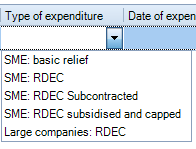
SME Basic Relief will give the additional deduction under R&D tax relief for SMEs.
The RDEC types will give the tax credit under the Research & Development Tax Credit scheme.
The Date of expenditure needs to be entered or selected from the date picker and must be within the current period of account.
Enter the Amount of expenditure.
Tick the R&D Capitalised box where the R&D expenditure has been capitalised in the company's financial statements.
Enter an amount in the RDEC in income box where the amount of Tax credit due has been included as income in the company's financial statements.
The Additional deduction is automatically calculated and is shown in the summary. The additional tax deduction will be shown in the adjusted trading result computation report and in the Other adjustments box within the trade adjustments window.
The Total enhanced expenditure is automatically calculated and is shown in the summary the total of the actual expenditure plus the additional deduction.
To claim tax relief for the surrender of losses for tax credits, you will also need to complete the appropriate claim in the Loss utilisation window and the claim for tax credits in the tax credits window.
Total expenditure only method of entering data - Summary
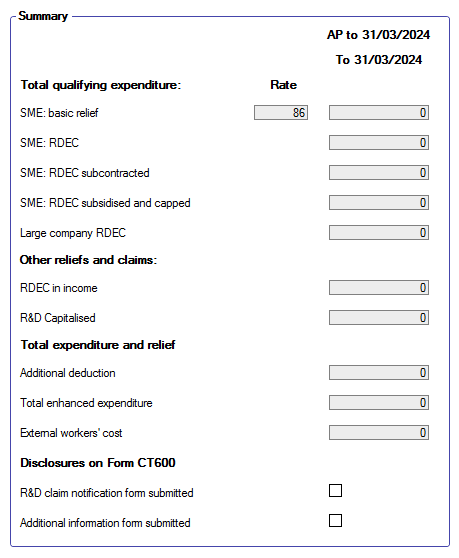
The summary will display more than one column where there is a change in the R& D rates during the Accounting Period and will also display more than column where there are multiple Accounting Periods in the Period of Account.
There are check boxes for disclosures on the CT600 where the company has already disclosed, in advance, to HMRC details of the claims it would make for Research and Development during the Accounting Period.