This section covers how to view and delete trial balances that have been filtered and saved through the Trial Balance screen.

Saved Trial Balance

Within CCH Accounts Production trial balances that have been filtered and saved from within the trial balance screen will be listed here.  Note: If the data is coming from CCH Trust Accounts the process differs, data comes directly from CCH Trust Accounts. 

To Access Saved Trial Balances

Accounts_Production_Data-Entry-Task-Bar_Transactions_Saved-Trial-Balance-button_1.png

Click on Saved Trial Balance from the Transactions folder in the Task Bar list. 

If there are saved trial balances Saved Trial Balance will appear in bold with a number in () , e.g. (3) to denote 3 saved trial balances. 
Accounts_Production_Data-Entry-Task-Bar_Transactions_Saved-Trial-Balance_2.png

Viewing Saved Trial Balances

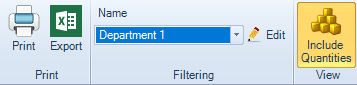
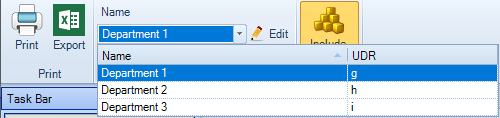
From the ribbon click on the down arrow to the right of the Name to display and select a trial balance which has been saved.  This will then be displayed on the screen.  If quantities have been included ensure you click Include Quantities on the ribbon.
Accounts_Production_Data-Entry-Task-Bar_Transactions_Saved-Trial-Balance_3.png

Deleting a Saved Trial Balance

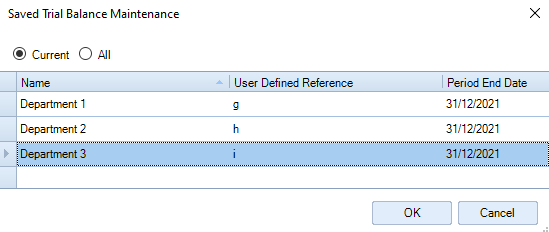
  1. Click Edit on the Ribbon.  The Saved Trial Balance Maintenance dialog appears.
     
Accounts_Production_Data-Entry-Task-Bar_Transactions_Saved-Trial-Balance_4.png
  1. Select Current or All.
  2. Highlight the row to select the trial balance to be deleted, if you have more than one trial balance saved.
  3. Press the Delete key on the keyboard and then click Yes on the confirmation message that appears.
  4. When done click OK to close the dialog.

Related documents

CCH Accounts Production/iXBRL essentials training online (10133804)/(10133819)
This document outlines a course on using CCH Accounts Production software, aimed at helping new users efficiently produce statutory accounts. The course includes 1 x 2 hour session and 1 x 3 hour session focusing on practical skills such as setting up accounting periods, importing trial balances, and navigating the software. It is designed for all employees involved in preparing statutory accounts. Training is conducted in an interactive environment called CloudShare, with additional resources available online for further learning and support.
CCH Accounts Production: essentials training online (10133819)
This document outlines a course on using CCH Accounts Production software, aimed at helping new users efficiently produce statutory accounts. The course includes two 2-hour sessions focusing on practical skills such as setting up accounting periods, importing trial balances, and navigating the software. It is designed for all employees involved in preparing statutory accounts. Training is conducted in an interactive environment called CloudShare, with additional resources available online for further learning and support.
CCH Accounts Production 2026.3 Hotfix: Release Notes
Release Notes for CCH Accounts Production 2026.3 Hotfix
CCH Accounts Production 2026.3: Release Notes
Release Notes for CCH Accounts Production 2026.3
CCH Accounts Production 2026.2: Release Notes
Release Notes for CCH Accounts Production 2026.2