
How To
Adding working papers on a client level
CCH Working Paper Management
Folders
- Open the relevant accounting period for the client you wish to look at
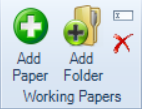
- Select where you want to add the folder in the statutory database tree, then on the ribbon select Add Folder
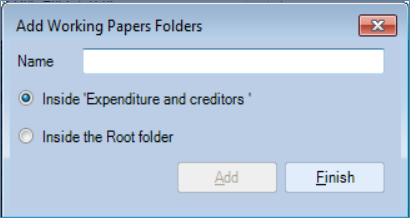
- Give the paper a name and select if you want it to be created inside the folder you;ve selected or inside the root folder
Files
- Open the relevant accounting period for the client you wish to look at
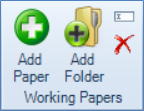
- Select the working papers folder you wish to add a paper to and select Add Paper from the ribbon
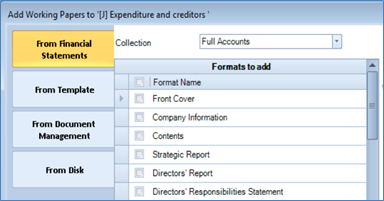
- There are 4 options to choose from when adding a paper
1) From Financial Statements
These are the same formats from Accounts Production that are supported for the entity you’re working on
You can either pick from Full Accounts, Management Accounts or Lead Schedules
2) From Template
These are the templates previously created by your practice using Microsoft Word or Excel
3) From Document Management
If you use Document Management a list of your documents for that client will be available here to add
If you don’t use the full version of Document Management any working papers or templates you have created will still be available to view from this list
4) From Disk
This allows you to add a document by browsing to a location on your PC/network etc
- Multiple papers can be added at the same time by ticking the boxes next to the relevant papers
- Papers can only be added under dedicated working papers sections
- Excel, Word, PDFs and image files can all be added as working papers
Related documents
Quick Start Guide
The document provides an overview of CCH Working Paper Management, a module integrated with CCH Accounts Production that facilitates the organization and management of working papers linked to financial statements. Key features include customizable templates, review functionalities, and centralized storage, which enhance workflow consistency and transparency across accounting practices. The module is equipped with restrictions related to specific master packs and user permissions. Overall, it aims to streamline accounting processes, improve collaboration, and maintain document integrity within the CCH software environment.
Homepage
This document provides a step-by-step guide on setting up the homepage for CCH Working Paper Management. It covers selecting a view, customizing the layout using the Toolbox, resizing components, accessing hidden columns, and applying filters. Additionally, it explains how to add tabs for notes, links, and sign-offs, and concludes by instructing users to save their changes and rename the homepage.
CCH Working Paper Management - Known Issues
The document outlines known issues related to CCH Working Paper Management as of June 2022. It details specific problems, such as PDF preview failures, tree node collapses during reviews, and errors with the statutory database. Workarounds are provided for some issues, while others are marked "TBC" (to be confirmed). It encourages users to join the CCH Central 'Group' on the Support Portal for updates on management tools and issues.
CCH Working Papers 2020.3 Hotfix: Release Notes
The document presents the release notes for CCH Working Papers 2020.3 Hotfix by Wolters Kluwer (UK) Limited. It emphasizes the importance of consulting the latest release notes for updates. The document includes a legal disclaimer stating that the information provided is for informational purposes only, and Wolters Kluwer is not liable for any inaccuracies. It also notes that all content is confidential and proprietary. Trademark information for various software is mentioned, along with a copyright statement prohibiting unauthorized reproduction or distribution of the release notes.
CCH Working Papers 2024.2 Hotfix: Release Notes
The document contains release notes for CCH Working Papers 2024.2 by Wolters Kluwer (UK) Limited, emphasizing the effort to ensure accuracy and completeness. It includes a disclaimer noting that the information is subject to change and should not be relied upon as a detailed software specification. The content is confidential and protected by copyright. Trademark rights are acknowledged for various software products. The document serves informational purposes and outlines the company's legal position regarding liability and intellectual property.