
Asset Classes
The Asset class section is used to define the ledger accounts which must be used for the posting of the asset transactions and the method of depreciation.
To create a New asset class select 'Fixed assets' from the grey menu bar followed by 'Classes'.

Under 'Related' click 'New asset class'.
All fields names which have been stared must by be completed before saving.
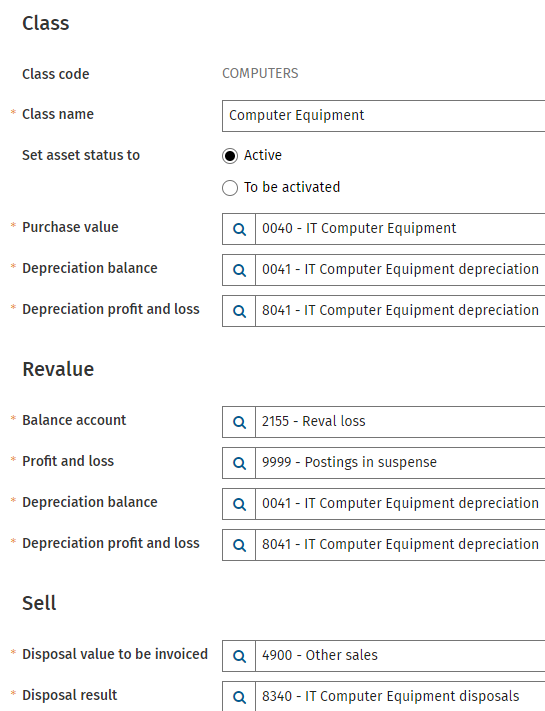 | Class code: The asset code is automatically created by the system. This code cannot be changed. Class Name: The description of the class. Set asset status: Active: If an investment is posted directly on the general ledger as defined in the company settings, this asset can be depreciated immediately. To be activated: If an investment is posted on a suspense account as defined in the company settings, this asset needs to be activated first before it can be depreciated. Purchase value: The balance sheet account for the investment values. Depreciation balance: The balance sheet account for the cumulative depreciation. Depreciation profit & loss: The P&L account for the depreciation charge. Revalue - Balance account: Fill the account on which the revaluation amount is posted. This can be an additional account or the same account used for the original purchase. Revalue - Profit and Loss: Fill the account for the revaluation reserve. In most countries this is a balance sheet account Revalue - Depreciation balance: This is the account where the depreciation amount/revaluation value (future) must be posted. This can be a new account but it can also be the depreciation balance account. Revalue - Depreciation profit and loss: This is the account where future calculated depreciation costs for the revaluation value must be posted. This can be a new account or the same as the depreciation profit and loss account. Sell - Disposal value to be invoiced: Fill in the nominated account for the selling price of the asset. Sell - Disposal: This account is used to post the difference between the book value and the selling price of the asset. |
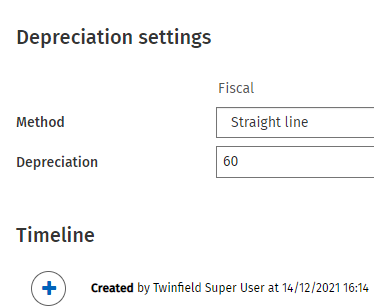 | Depreciation: Choose from different methods on how the assets must be depreciated. Per regime you can define a different method. Method:
Depreciation: Depending on the method chosen you can select either periods or percentage. Timeline: Captures change |