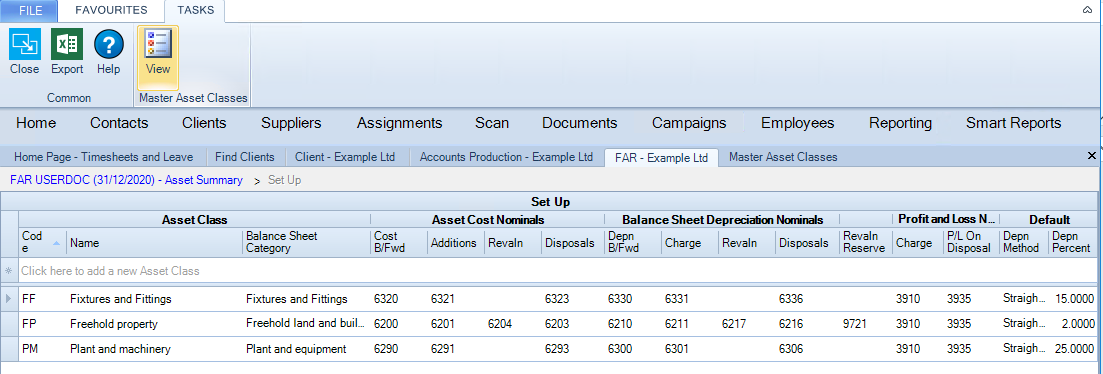
Master Asset Classes are accessed via the View Icon within the Master Asset Classes area of the Fixed Asset Register's Set Up screen top Ribbon.
clipboard_e44f5f95fff579c84117c95f7a49974af.png

The Master Asset Classes provide defaults for setting up Asset Classes at client level. The columns are the same as those for the client Asset Classes.

The Master Asset Classes are part of the CCH Accounts Production versioning system. This means that CCH ship values that relate to the CCH chart of accounts for each entity. These CCH Master Asset Classes cannot be edited.

However, if the user creates a new Practice Master Pack then the Master Asset Classes can be edited. 
The documentation on creating Practice Masters is CCH Accounts Production Master Pack Versioning AP Administrators Guide.pdf

Although the Master Asset Classes cannot usually be edited, the Asset Classes that are created on each client can be edited as the Master Asset Classes only provide defaults for setting up the client Asset Classes.

The Master Asset Classes are accessed through the Set Up screen and can also be accessed through File > Maintenance > Accounts > Master Asset Classes.

Related documents

Part Disposals
Part Disposals
Changing Entity Type
Asset Movement
The document outlines the functionality of the Asset Movement screen, detailing how asset transactions are recorded in the Fixed Asset Register, independent of CCH Accounts Production. It describes five types of movements: Cost B/Fwd, Addition, Adjustment, Revaluation, and Disposal, each with specific criteria and purposes. The document also covers the protocol for asset movement dates, especially concerning finalized periods, and discusses the Change of Method movement for altering depreciation methods. Additionally, it includes guidelines on how movements affect nominal accounts and the conditions under which movement deletion is permissible.
Asset Classes
The Asset class section is used to define the ledger accounts which must be used for the posting of the asset transactions and the method of depreciation.
Quick Start Guide
A comprehensive detailed Quick Start Guide available for download. Users can also access sample reports for the Fixed Asset Register to better understand reporting styles. Links to visual aids, guides, and report samples are provided throughout to facilitate the learning process.