The master pack designer can create a list of audit assertions that they wish to use for the audit.

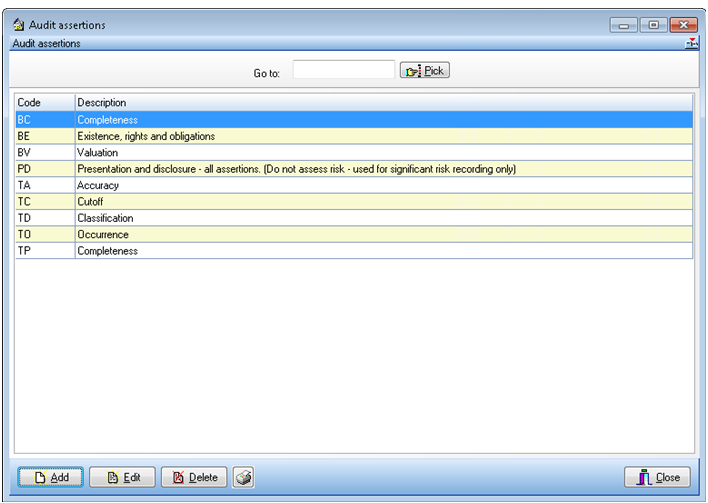
To edit the assertions, load the pack for editing and choose the Assertions option within Risk Model in the Master options list.  The system will display the Audit assertions dialog a list of the assertion codes and descriptions.
 

clipboard_ef1ee9b46798fc922f9f67dbe70b42bf5.png


Audit assertions dialog

Adding an audit assertion

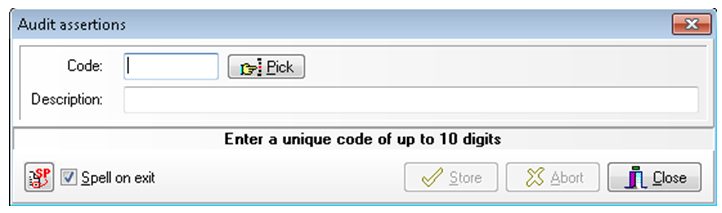
To add an assertion, click on the [Add] button to display the Audit assertions dialog. 
 

clipboard_e43ab6c435fcc979beb5128624b4a8aaf.png


Audit assertions form

Enter a code to identify the new assertion which can contain up to 9 characters. Then enter a description of the assertion.  Click on [Store] to save the code and clear the contents of the dialog to allow you to enter another new assertion. 

When you have finished adding entries, click on [Close].  The [Abort] button is provided to allow you to clear the contents of the dialog if you have started to make an entry but decide that you do not wish to proceed with it. When you close the dialog, the system will return to the Audit assertions list and the new entries will be included.

Editing an audit assertion

To edit the description of an audit assertion, either double click on the assertion, or select it and click on [Edit].  The Audit assertions form displays the audit assertion description.  Edit this and click on [Store] to save your changes. Clicking on [Abort] will clear the form without recording any changes that you may have made.

Deleting an audit assertion

To delete an audit assertion, click on the assertion then click on [Delete].  The system will request that you confirm your actions before deleting the entry.

Related documents

Inherent Risk Questions
This document outlines the process for assessing inherent risk in clients through a systematic approach of questions. The system can store up to 99 risk areas, each containing 99 questions, which are assigned point scores for "Yes" and "No" answers. It details steps for editing, adding, and deleting risk areas and questions, including interface navigation and confirmation prompts. Additionally, it emphasizes that once numbers are assigned to risk areas or questions, they cannot be changed. The document serves as a guide for managing inherent risk assessments effectively.
Audit Risks
This document details the functionality of CCH Audit Automation for recording Identified Audit Risks, also referred to as Significant Business Risks. It provides instructions for users to add, edit, and manage risks, including features for maintaining risks for future audits, assessing their significance, and linking them to assertions. The system includes tools for risk assessment, audit response, and documenting conclusions. Other functionalities encompass risk summarization, printing options, and risk linkage across multiple sources, enhancing the audit process's efficiency and accountability.
Default Specific Risk Questions
CCH Audit Automation allows users to define specific risk questions for audit areas, although it's not mandatory. If no specific questions are set, default questions will be used. Users can edit the default questions through the "Specific risk questions" option in the Risk Model section. Up to 99 default questions can be defined, similar to inherent risk questions. The system utilizes a lookup table that combines specific and inherent risks for audits, with editing instructions provided in the manual.
Risk/Sample Selection
This document outlines the concept of audit risk, defined as the likelihood of undetected material errors during an audit. It introduces a risk model used in Audit Automation that requires total audit risk to remain below acceptable levels across various audit areas. The risks are broken down into inherent risk, control risk, and detection risk, with further subdivisions for detection risk. It emphasizes the importance of understanding these concepts to design effective audit procedures and assess risk at different levels. Additionally, it discusses general and control environments, and the calculation of residual risk, alongside a risk scoring system.
Inherent Risks
The document outlines the procedure for addressing inherent risk questions in an audit context. Users can access a dedicated window to view up to 99 risk areas, answer questions, and modify responses as necessary. The system prompts users to validate changes to ensure proper risk assessments. It includes functionalities for viewing prior comments, copying text, and overriding calculated risk levels, emphasizing that auditor judgment is crucial. Comments on overrides must be provided to rationalize any adjustments made. The document serves as a guide for navigating and utilizing the auditing software effectively.