Bad Debt Relief

How do I correct the VAT Return boxes which are affected by a bad debt relief transaction posted by the CCH Practice Management integration?

Reference

These notes are based on HMRC guidance (as at January 2022) and are restricted to advising how to post adjusting entries to the VAT return in Twinfield so that the figures are reported in the relevant VAT return boxes in Twinfield.  You should refer to the HMRC guidance notes to understand the full rules around Bad Debt Relief.

(https://www.gov.uk/guidance/relief-from-vat-on-bad-debts-notice-70018#claiming-bad-debt-relief)

Claiming bad debt relief

From HMRC guidance notes, the following is explained.

“2.4 How to claim bad debt relief

To claim a refund, you should include the amount of the VAT you’re claiming in box 4 of your VAT Return which covers the date when you fulfil the conditions to make a claim.”

When a bad debt adjustment is posted via CCH Practice Management the following transaction is created in Twinfield

Using an example transaction of Invoice £100 + £20 VAT which has been written off
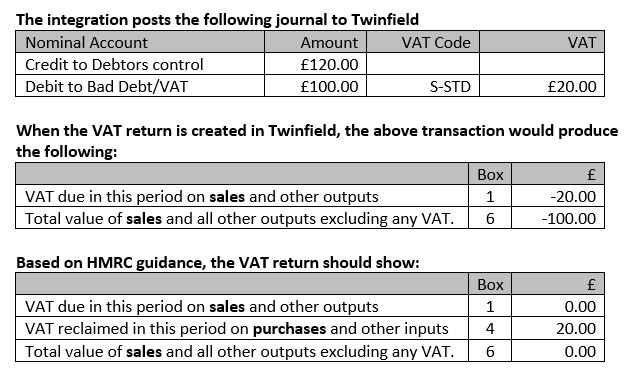
clipboard_ef7a968e8b1dbe2e9a24fcffcba7fcdf1.png

Adjusting journal required to Twinfield for bad debt relief

Setup

We recommend creating the following additional VAT codes in Twinfield to allow these adjustments to be identified in the audit trail.
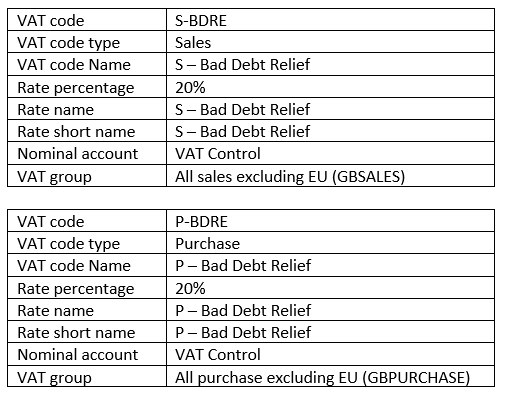
See creating a new VAT code

clipboard_e20ef846150893dfa4b661c57b0e25f7d.png

Adjusting Journal

With the recommended additional VAT codes created, the following journal can be posted to Twinfield to make an adjustment to the VAT return boxes.

This adjustment is based on the example of a bad debt write off £100 + £20 VAT
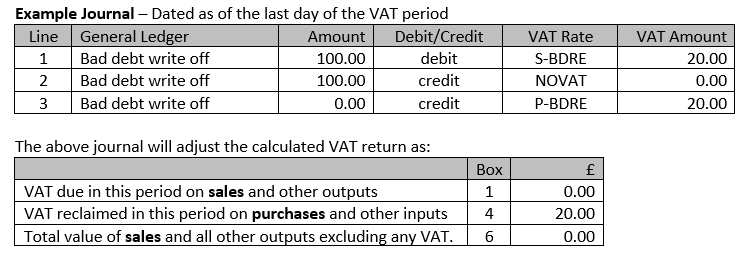
clipboard_e47e7d55f89dd9af26d0a41bd7ca4df5e.png

Receiving payment for a written off invoice

If a customer pays a debt which has been written off, the guidance says;

“3.14 If you receive payment after claiming bad debt relief

If you have claimed a refund under this scheme and you later receive a payment for the supplies, you must repay to us the VAT element included in the payment. All payments you receive for the supply or supplies must be shown in your separate bad debt account. When you’re repaying all or part of your refund, put the amount you’re repaying in box 1 of your VAT Return for the period in which you received the payment.”

Posting via the bank statement screen

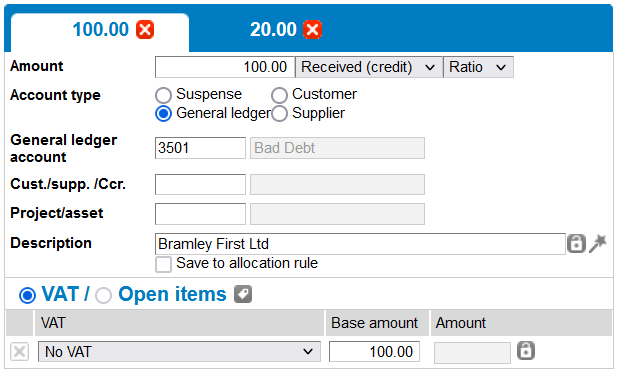
  • Split the amount receive on the bank statement between net and VAT values.
    clipboard_ea74b1aa53f967a8da58efc16f160d480.png
    • Code the net amount to bad debt general ledger account using the NO VAT for the VAT code
       
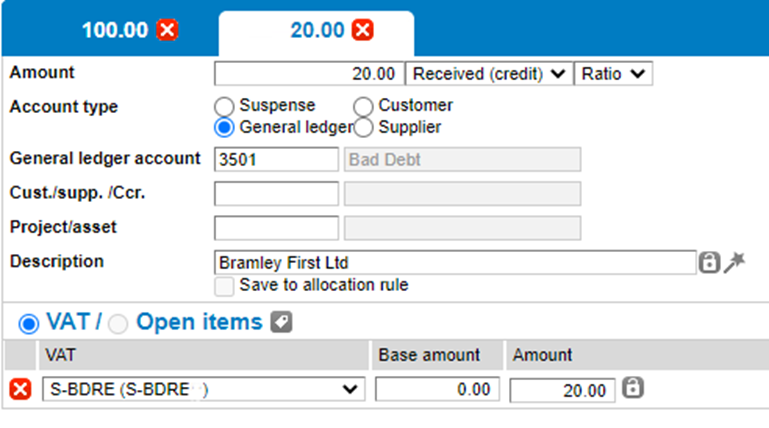
  • Code the second tab to bad debt
    clipboard_ef5a2c27b14e67587f4bc483fd0e0edc5.png
    • Select the S-BDRE VAT rate
    • Amend the VAT amount by clicking on the padlock and entering the total VAT amount
    • Amend the Base amount value to 0.00

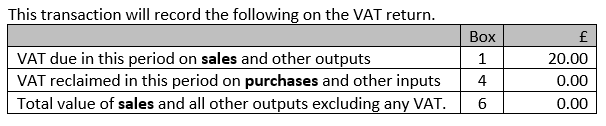
clipboard_ead47285fe9ea3c47ad71e791e0da1049.png

Related documents

Cheques and Paying-in slips
Cheques and Paying-in slips.
Twinfield: Twinfield Analysis Consultancy (10091307)
This document outlines a training course on Twinfield accounting software, designed for Twinfield partners and subscribers. The course, lasting up to 3 hours, focuses on enabling participants to leverage their Excel expertise to manipulate TwinCube data for creating comprehensive financial reports. Key objectives include processing transactions and searching via the reporting module. The session covers various topics such as data cube management, Excel formula building, and conditional formatting. Attendees must have advanced Excel skills and their own devices to join the session, as the course is tailored for Microsoft Windows users.
Twinfield Consultancy (10093303/10080551)
This document outlines a consultancy service for Twinfield users, targeting both partners and subscribers. It emphasizes collaborative sessions aimed at improving operational efficiencies and best practices through tailored advice and process reviews. Conducted online or onsite over two 3-hour sessions, the consultancy covers topics such as reporting, VAT reporting, and reconciliations. Attendees are expected to have a solid grasp of double entry bookkeeping. Additional resources, including eLearning courses, videos, and webinars, are provided for further learning.
Twinfield: Integration Consultancy (10095230/10095228)
This document outlines a consultancy-led course focused on the Twinfield accounting software, designed to assist businesses in managing their financials effectively. The course consists of four interactive sessions—each lasting three hours—covering navigation, invoicing, credit management, transactions, and reporting. Aimed at Twinfield partners and subscribers, participants are expected to have a good understanding of bookkeeping principles. Additional resources such as eLearning courses, videos, and webinars are also provided to enhance learning. The maximum group size is six delegates.
Twinfield: PM Integration Consultancy (10091304/10091303)
This document outlines a training course for Twinfield accounting software users, focusing on its integration with CCH Central. The course consists of four sessions, each lasting about three hours, aimed at enhancing attendees' bookkeeping skills and knowledge of both systems. Key objectives include familiarization with CCH Practice Management and Twinfield, as well as hands-on experience with financial processes such as invoicing, bank transactions, and VAT reporting. Prerequisites include a good understanding of CCH Central and appropriate permissions. The course is intended for Twinfield partners and subscribers, with a maximum of six delegates per group.