
Bill Covering Letter setup
Configuration
The ability to create a standard covering letter in addition to the bill is controlled by a configuration key. To utilise this feature, CCH Document Management needs to be licensed and the following configuration key needs to be set up under Maintenance -> User Defined -> Configuration
| Key Name | Key Value | Comment |
| BillCoveringLetterEnable | 0 | There is no change within Billing Wizard & Maintenance settings |
| BillCoveringLetterEnable | 1 | Activates functionality to generate Covering Letter within Billing Wizard & Maintenance settings |
The Key value being set to 0 or not present, results in no change to the application.
Creating the Bill template
In order to use this facility you will need to first format a new Billing template. You can find this from the PMTemplates folder of the installation directory for CCH Central (please see your system administrator for this location).
The template consists of two pages. The first is an example of the covering letter and this will need to be customised to your requirements. The second page can either be customised, or you can copy your existing fee template over the top so that it is ready for use.
Maintenance – letter Master Paragraphs
An option is available under Maintenance -> Documents -> Covering Letter Master Paragraphs which allows users to setup and store a list of standard covering letter paragraphs to be used during billing:
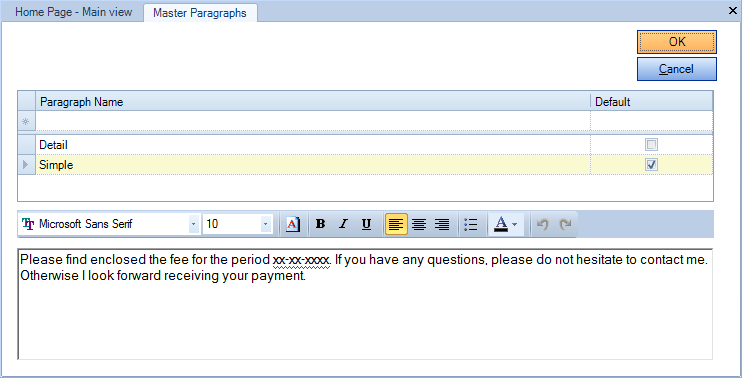
A paragraph can be selected as ‘Default’ and this will be automatically displayed within 'Stage Three A' of the Billing Wizard.
Document Styles – Covering Letter column
Maintenance – Document Styles
When the configuration key is enabled, a Covering Letter Master Paragraph Option is available within Document Styles and a tick box option called ‘Covering Letter’ is added to 'Stage Three' of Billing Wizard:
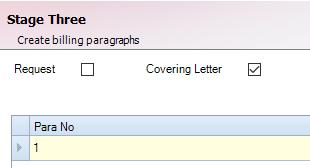
You should create new styles IN ADDITION to your existing document styles as these may be required for viewing historic bills or if you do not use the covering letter for all Invoices. In addition, if you want a template with covering letter for RFP’s/Credit Notes etc., you will need to set them up in the same way:
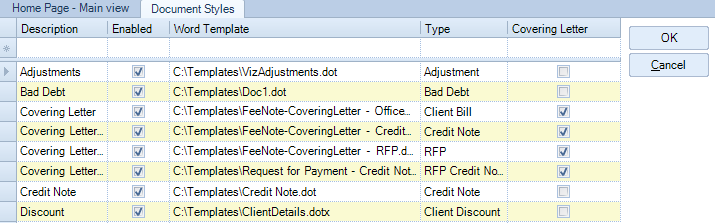
The Templates must then be attached to the relevant Company/Office as detailed previously. A covering letter default can be set in addition to a “standard” client Bill etc.
When processing a bill, if the Covering Letter option is selected within 'Stage Three' of Billing Wizard, then the Style selection box is automatically populated with the default template set for the relevant type of Bill (Bill, RFP or Credit Notes).