
Capital Allowances Summary
You can view a summary of the company's claim for Capital Allowances on an Accounting Period by Accounting Period basis.
Viewing the Capital Allowances Summary Window
This is located under Trading income > Trade name > Capital Allowances or Management Expenses > Capital allowances.
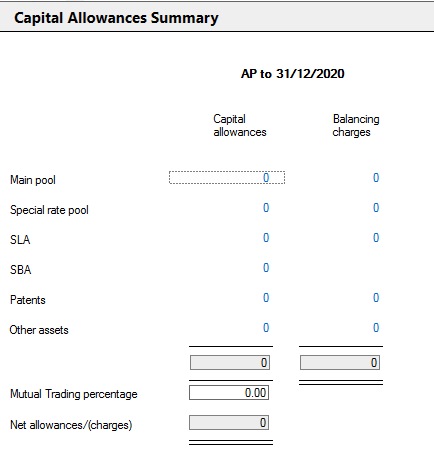
You can access the data screens for each allowance by a click on the hyperlinked value.
Capital Allowances include Balancing Allowances.
Mutual trading entities
A reduced claim to allowances and charges for Mutual trading entities should be made in the window.
Enter the percentage of the overall allowances and charges to be claimed in the Mutual Trading percentage box
The Net allowances/(charges) being claimed as a result of the percentage entered is displayed
The CT600 will automatically show the restricted amount of allowances and charges claimed.
The computation will only show the percentage claimed on the Capital allowances Summary reports for both trades and Management Expenses.
- Capital Allowances Summary
The Main Pool is available in the Trading Summary and Management Expense sections of the Data Navigator
You can claim capital allowances at the special rate in the SR Pool.
Enhanced Capital Allowances - Super Deductions
How to apply 'super deductions' for Enhanced Capital Allowances.
You can use this feature to add capital assets eligible for short life assets claims.
- Structures and Buildings Allowances
You can use this to claim BPRA on qualifying expenditure. The total qualifying addition to a property in an AP should be shown as a seperate asset.
Research & Development Allowances
You can use this to claim Capital Allowances on expenditure for Research & Development. The data entries are made by reference to the Accounting Period rather than the Period of Account.
You can use this to claim Capital Allowances on Know How acquired on or before 31 March 2002.
You can use this to claim Capital Allowances for qualifying expenditure incurred on Patents on or before 31 March 2002
You can use this to claim Capital Allowances on Other qualifying expenditure that is not relieved elsewhere within Capital Allowances.