
How To
Client activation resources
CCH OneClick
A collection of resources to help you explain the benefits of CCH OneClick activation to your clients.
Follow these quick steps to activate clients.
- ► Set task permissions to activate clients for CCH OneClick
- 1. In CCH Central, select File > Maintenance > Security > Task Permissions > OneClick
2. Select OneClick from the product dropdown and tick Enable access to OneClick - ► Activate clients in CCH Central
- 1. Make sure the client has a CCH OneClick activated employee as either the client partner or part of the client team
2. Open the client record & select Activate OneClick on the ribbon bar
3. Select the features that you want to make available to that client
Client activation video
This video explains the activation process for Clients, once they have received an activation email.
|
Video: Activating your Wolters Kluwer Account |
|
We also have a page of Wolters Kluwer Account videos relevant to your clients, that you can link them to directly.
The activation process for your clients is illustrated in this simple flow:
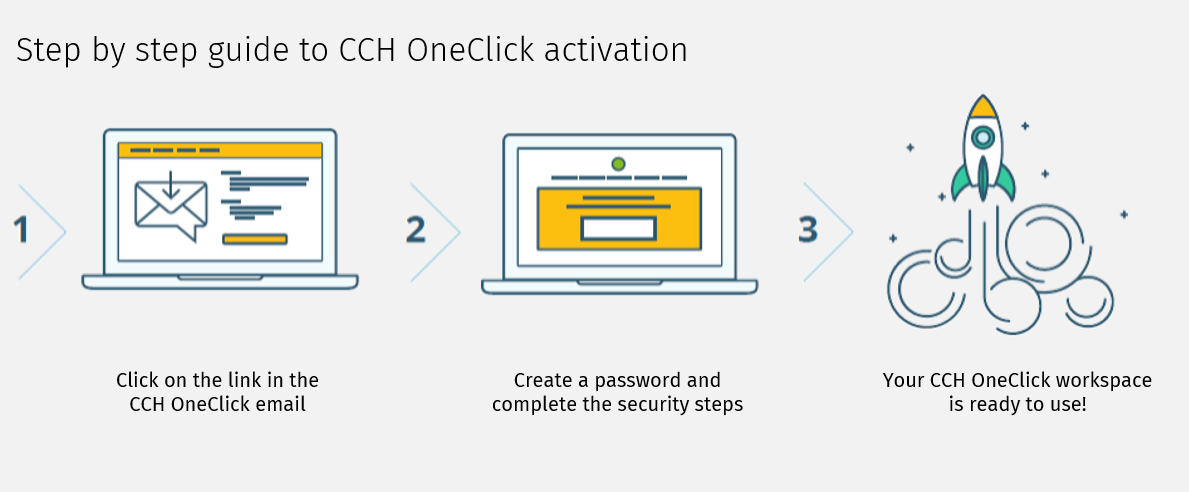
Client Activation Resources
To make the client activation process easy for you, we have created a CCH OneClick - Client Activation Pack to help you communicate with your clients as they activate.
Click the link above to download a folder of resources including:
- a welcome email template which your practice is free to brand as coming from you
- an infogaphic that can be branded for your practice that explains what CCH OneClick is and why your clients should be adopting it (2 versions – 1x Landscape and 1 x Portrait)
- a flier in MS Word format showcasing CCH OneClick and illustrating the benefits to them of collaborating with you in this way. Simply enter your contact details and logo onto the top of the flyer, then save as a PDF before attaching to the welcome email. (If the flyer opens in protected mode, please select View > Document)
- an animated explainer video which speaks from the accountant to their client around the benefits of using CCH OneClick.
A user guide for the client workspace of CCH OneClick can be found here.
Related documents
Step by Step Guide to Making Tax Digital (MTD) : HMRC sign up
This user guide assists users in navigating the sign-up process for Making Tax Digital (MTD) for VAT, clarifying that while Wolters Kluwer does not facilitate the sign-up, it has provided this resource to ease the process. Key points include creating an Agent Services Account for agents, the significance of the Business Tax Account, the steps to link existing and new clients, and the requirement for MTD-compatible software for submissions. It also highlights deadlines and contact information for HMRC support. Additionally, it refers users to helpful webinars and resources related to MTD.
eSign User Guide
This document outlines the operational guidelines for using the eSign functionality within CCH Central, emphasizing the need for Microsoft Edge WebView2 Runtime installation. It details the eSign and Approval processes for sending documents, including directions for document preparation and the management of multiple signatories. Key features include newly added email templates, internal signature capabilities, and updated status tracking in both Message Centre and Document Centre. Users can utilize various acrofields for signatures and customize their signing experience. Enhanced communication is facilitated through automated notifications and document management functionalities.
CCH OneClick 2026.1: Release Notes
Release Notes for CCH OneClick 2026.1
Get Started with Making Tax Digital for VAT
This document outlines the essential resources and steps required for getting started with Making Tax Digital (MTD) for VAT. Key points include the necessity to register with HMRC, create an agent services account, and authorize Wolters Kluwer Software. It emphasizes the importance of having a CCH OneClick account to access MTD features. The document also provides quick start guides, video tutorials, and client resources to facilitate a smooth transition to digital VAT returns. Additionally, there are links to guides for both clients and advisors to enhance understanding and implementation of MTD processes.
Activating individual clients
This document provides a comprehensive guide on activating individual clients for the CCH OneClick client workspace. It outlines necessary pre-checks, including verifying unique client email addresses and team responsibilities. The activation process can be done for single or multiple clients, with detailed steps for each. Additionally, there are options for enabling various features within OneClick for clients, including sending welcome messages and monitoring activation status. The document also highlights optional features available for clients after activation, ensuring effective client management within the OneClick system.