
How To
Export a Tax Workflow (Legacy)
CCH Personal Tax
-
Select File>Maintenance>Central Workflow>Standard Workflows from the menu.
-
Highlight the workflow that you want to export by selecting the relevant grid line.
-
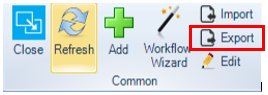
Click the Export option in the ribbon bar:
-
Navigate to the directory where you want to save the workflow.

-
Give the work a name and keep the file type as displayed above then click Save.
Related documents
Enter Agent Credentials
The document outlines the procedures for adding online filing credentials for tax returns, prioritizing employee, departmental, and database credentials. Instructions for adding login details for individual employees involve searching for the employee and entering agent credentials in the Online Filing Details tab. Additionally, there are steps for entering organizational login details via the Tax System Parameters menu, specifying user ID, password, and email, followed by selecting the filing organization type. The document emphasizes related topics for further reference.
CCH Personal Tax 2026.210 Service Pack: Release Notes
CCH Personal Tax 2026.210 Service Pack: Release Notes
CCH Personal Tax 2026.2: Release Notes
Release Notes for CCH Personal Tax 2026.2
Generating the Online Filing Submission and IR Mark
The document outlines the process for validating a tax return before submitting it to HMRC. It specifies steps to open the tax return, validate it against HMRC standards, and correct any errors. It also describes how to add attachments, including schedules and the SA302 form, while noting attachment size limitations. Finally, the process to generate the IR mark is detailed, highlighting that it occurs only when no validation errors remain. This includes data saving, error checks, and snapshotting the tax return for database records.
Tax Return Bundle Window
The Tax Return Bundle window facilitates the creation of a comprehensive tax return package, including a Transmittal Letter. This document outlines various sections, such as setting the date of issue, customizing cover letters, selecting which tax return items to include, and adding additional documents. It also covers the bundle creation process and the functionality of locking the window. Overall, it serves as a guide for users to efficiently manage and generate tax return documentation using the specified features of the software.